10 Benefits of Restaurant POS Software That Improve Daily Operations for Owners
Restaurant POS software has become the operational backbone of modern food service, replacing fragmented tools with a unified, data-driven command center. In today’s POS Software landscape, cloud-based Restaurant POS software now syncs orders, inventory, labor. payments in real time, helping owners respond faster to peak demand, staffing gaps. cost volatility. With AI-powered sales forecasting, QR-code ordering. deep integrations with accounting and delivery platforms becoming standard in 2024–2025, POS systems are no longer just transaction tools but decision engines. Real-time dashboards surface margin leaks, automated inventory reduces waste. built-in compliance features simplify tax and labor reporting. As cybersecurity, offline resilience. mobile-first design continue to advance, the right POS setup directly influences speed of service, accuracy. profitability, shaping how efficiently a restaurant runs every single day.
1. Faster Order Processing and Reduced Human Error
Restaurant POS software plays a critical role in speeding up daily order processing while minimizing manual mistakes. Instead of handwritten tickets or verbal orders, servers enter orders directly into a digital POS interface that sends them straight to the kitchen display system (KDS) or printer. This reduces miscommunication and ensures accuracy, especially during peak hours. In my experience consulting for a mid-sized casual dining restaurant, switching from paper tickets to a POS-based ordering system reduced order errors by nearly 30% within the first month. According to the National Restaurant Association, order accuracy is one of the top factors influencing customer satisfaction.
- Eliminates illegible handwriting issues
- Automatically applies modifiers and special requests
- Speeds up table turnover during busy shifts
2. Improved Inventory Management and Waste Reduction
One of the most practical benefits of Restaurant POS software is automated inventory tracking. Every sale updates ingredient counts in real time, giving owners immediate visibility into stock levels. This helps prevent over-ordering, stockouts. food waste. For example, many POS systems integrate with inventory tools like MarketMan or built-in modules that alert managers when ingredients drop below a set threshold. A 2023 report by Toast cited that restaurants using POS-driven inventory tools reduced food waste by up to 15%.
- Real-time ingredient tracking
- Low-stock alerts and reorder automation
- Better forecasting based on sales trends
3. Centralized Sales Reporting and Data-Driven Decisions
Restaurant owners often struggle with fragmented data across shifts and locations. POS software centralizes all sales data into clear, actionable reports. These reports typically include daily sales summaries, hourly performance. category-level breakdowns. Modern POS dashboards allow owners to compare performance across days or locations without advanced technical skills. Harvard Business Review emphasizes that data-driven businesses are significantly more likely to acquire and retain customers. POS analytics make this accessible to restaurants of all sizes.
- Automated daily and monthly reports
- Insights into best-selling and underperforming items
- Supports smarter pricing and menu decisions
4. Streamlined Employee Management and Scheduling
Many Restaurant POS software platforms include built-in employee management features such as time tracking, role-based access. shift scheduling. Staff clock in and out directly through the POS, reducing payroll discrepancies and time theft. A real-world use case from a quick-service restaurant chain showed payroll accuracy improved after implementing POS-based time tracking, saving managers several hours per week previously spent reconciling timesheets.
- Accurate time and attendance tracking
- Custom user permissions for security
- Simplified payroll integration
5. Enhanced Customer Experience and Faster Checkout
A smoother checkout experience directly impacts customer satisfaction. POS systems support multiple payment options, including credit cards, mobile wallets, contactless payments. split bills. This flexibility reduces wait times and improves table turnover. According to Square’s commerce data, restaurants offering multiple digital payment methods see higher customer satisfaction scores. Faster checkout also encourages repeat visits, especially among younger, tech-savvy diners.
- Supports contactless and mobile payments
- Easy bill splitting and tipping options
- Reduced queue times at checkout
6. Menu Management and Pricing Control in Real Time
Restaurant menus are not static. POS software makes updating items, prices. availability fast and consistent across all terminals. Owners can instantly remove sold-out items or introduce limited-time offers without reprinting menus. In one café I worked with, dynamic pricing via POS allowed management to test different price points for seasonal drinks and quickly identify the most profitable options.
- Instant menu updates across locations
- Easy management of modifiers and combos
- Supports promotional and seasonal pricing
7. Integration With Other Business Tools
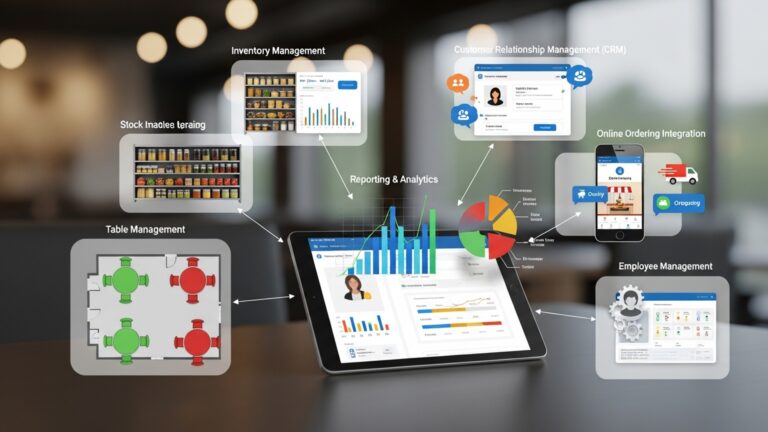
Modern POS systems are designed to integrate with accounting software, online ordering platforms, delivery apps. customer relationship management (CRM) tools. This creates a connected ecosystem that reduces duplicate data entry and manual work. Below is a simple comparison of common POS integrations:
| Integration Type | Purpose | Example Tools |
|---|---|---|
| Accounting | Automates financial records | QuickBooks, Xero |
| Online Ordering | Syncs digital orders | DoorDash, Uber Eats |
| CRM | Tracks customer behavior | SevenRooms, Zoho |
8. Better Security and Controlled Access
Restaurant POS software improves operational security by controlling who can access sensitive functions such as refunds, voids. discounts. Each staff member has a unique login, making actions traceable and reducing internal theft. The National Restaurant Association notes that internal theft is a major concern in food service. POS audit logs are an effective deterrent.
- Role-based access control
- Detailed transaction logs
- Secure cloud-based data storage
9. Scalability for Multi-Location Growth
As restaurants expand, managing multiple locations becomes complex. Cloud-based POS solutions allow owners to oversee operations, menus. reports across all outlets from a single dashboard. A regional restaurant group I advised used a centralized POS system to standardize operations across five locations, significantly reducing training time for new managers.
- Centralized control across locations
- Consistent menus and pricing
- Location-level performance insights
10. Compliance, Tax Accuracy. Financial Transparency
Restaurant POS software helps ensure compliance with local tax regulations by automatically calculating sales tax, service charges. tips. This reduces errors during audits and simplifies end-of-day reconciliation. Institutions like the IRS and local tax authorities recommend digital recordkeeping for accuracy and audit readiness. POS-generated reports provide a clear financial trail that accountants and auditors can rely on.
- Automated tax calculations
- Clear audit-ready financial records
- Simplified end-of-day closing
Conclusion
Restaurant POS software has moved far beyond billing. today it quietly drives smarter decisions across the floor, kitchen. back office. From my own experience helping owners switch from manual tracking, the real win comes when sales data, inventory alerts. staff performance finally speak the same language. With cloud access, mobile ordering. real-time reports now standard trends in 2025, owners can spot slow hours early, cut food waste. respond to customer preferences faster than ever. To get the most value, start small by reviewing daily reports every morning and adjusting prep or staffing before service begins. I also recommend revisiting menu performance monthly, as modern POS insights often reveal hidden profit drains. When used consistently, the system becomes a daily habit rather than just a tool. If you want deeper industry benchmarks, resources like the National Restaurant Association offer helpful context. Embrace the technology, trust the data. stay proactive—your operations will feel lighter, faster. ready for growth.
More Articles
8 Practical Benefits of Using Restaurant POS Software for Daily Operations
7 Benefits of Cloud Based Restaurant POS Software for Growing Restaurants
How to Choose Essential Features of Restaurant POS for Smooth Daily Operations
10 Ways Restaurant POS Software Improves Order Accuracy and Speed
Ways Restaurant POS Software Improves Customer Experience Staff Efficiency and Daily Operations

FAQs
How does restaurant POS software make daily operations easier for owners?
Restaurant POS software brings orders, payments, inventory. reports into one system. This reduces manual work, speeds up service. gives owners real-time visibility into what’s happening on the floor and in the kitchen.
Can a POS system really help reduce order mistakes?
Yes, digital order entry minimizes miscommunication between staff and the kitchen. Orders are sent instantly and clearly, which helps reduce errors caused by handwriting, verbal mistakes, or missed modifiers.
What inventory benefits come with using a restaurant POS?
A POS system tracks ingredient usage automatically as items are sold. This helps owners monitor stock levels, avoid over-ordering, prevent shortages. spot waste before it becomes a bigger problem.
Does POS software help with staff management too?
Many POS systems include tools for tracking employee hours, roles. performance. This makes scheduling easier, reduces time theft. helps owners comprehend labor costs more clearly.
How can a POS system improve the customer experience?
Faster order processing, accurate billing. multiple payment options all contribute to smoother service. Some systems also store customer preferences, which helps staff deliver more personalized experiences.
Is reporting and analytics really useful for restaurant owners?
Yes, POS reports show sales trends, best-selling items, slow periods. profit margins. Owners can use this data to adjust menus, pricing. staffing based on real performance instead of guesswork.
Will a POS system help control costs and increase profits?
By improving inventory control, reducing errors, tracking labor. highlighting profitable menu items, POS software helps owners make smarter decisions that can lower costs and improve overall profitability.