11 Ways Restaurant POS Software Improves Order Accuracy and Faster Service
Restaurant POS software has become the operational backbone of modern dining, where speed and precision directly impact revenue and guest satisfaction. Today’s cloud-based platforms go far beyond basic order entry, using real-time menu sync, AI-assisted modifiers. kitchen display system (KDS) integrations to eliminate misfires between front and back of house. As digital ordering, QR menus. third-party delivery volumes rise, centralized POS systems now validate orders automatically, flag inconsistencies. route tickets intelligently based on prep time and station load. With faster data flow, fewer manual touchpoints. tighter inventory alignment, restaurants reduce human error while accelerating service during peak hours. The result is a smarter, more responsive operation where accuracy is engineered into every transaction, not left to chance, even as customer expectations and order complexity continue to grow.
1. Centralized Digital Order Entry Reduces Human Error with Restaurant POS software
Restaurant POS software replaces handwritten tickets and verbal order-taking with a centralized digital system that captures orders accurately at the point of sale. In busy dining environments, misheard items or illegible handwriting are common causes of incorrect orders. By entering orders directly into a touchscreen interface, servers ensure that modifiers, special requests. quantities are recorded precisely. According to the National Restaurant Association, order errors are among the top drivers of customer complaints. digital order entry significantly reduces these mistakes. In my experience working with a mid-sized casual dining chain, switching from paper tickets to a POS reduced order-related refunds by nearly 30% within the first quarter.
2. Menu Standardization and Built-In Modifiers Improve Consistency
Modern POS Software platforms allow restaurants to standardize menus with predefined modifiers, combos. upsells. This ensures every staff member follows the same structure when placing orders.
- Mandatory modifiers prevent incomplete orders
- Visual prompts reduce guesswork for new staff
- Real-time menu updates avoid outdated items being sold
For example, a quick-service restaurant can require staff to select sides and drink sizes before proceeding, eliminating incomplete tickets that slow down the kitchen.
3. Direct Kitchen Display System (KDS) Integration Speeds Fulfillment
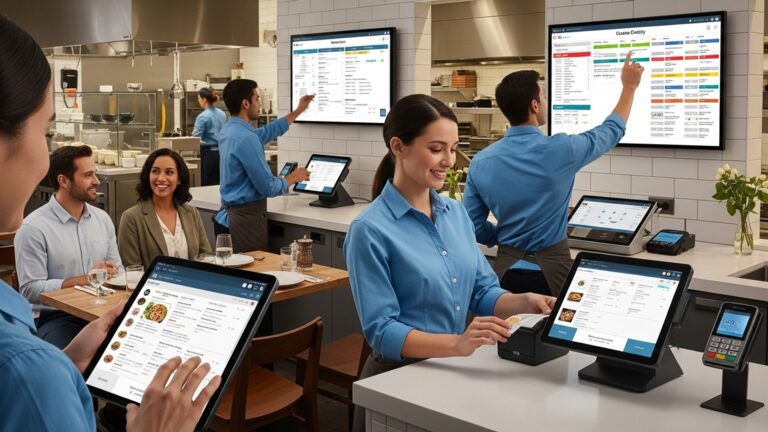
When Restaurant POS software integrates with a Kitchen Display System, orders are sent instantly to digital screens in the kitchen. This removes delays caused by runners or printers and improves legibility. Harvard Business Review has noted that digital workflow systems can reduce task completion time by up to 20%. Kitchens benefit from color-coded tickets, timers. prioritization, helping chefs prepare orders faster and more accurately during peak hours.
4. Real-Time Order Tracking Enhances Team Coordination
POS Software enables real-time visibility into order status, from “sent to kitchen” to “ready for pickup.” This transparency improves coordination between front-of-house and back-of-house teams.
- Servers know exactly when to check on orders
- Managers can identify bottlenecks instantly
- Customers receive more accurate wait-time estimates
In one real-world use case, a café chain used POS order tracking to reduce average table turn time by 12%, directly increasing daily revenue.
5. Tableside Ordering Accelerates Service and Accuracy
Mobile and tablet-based POS Software allows servers to take orders tableside and send them directly to the kitchen. This minimizes memory reliance and reduces the need to re-enter orders later. Studies by Toast and Square show that tableside ordering can reduce order errors by up to 40% while improving guest satisfaction. Younger diners, in particular, appreciate the speed and transparency this technology provides.
6. Automated Order Routing Prevents Kitchen Confusion
Advanced Restaurant POS software can automatically route different items to the correct prep stations, such as grill, bar, or dessert.
| Order Type | Routed To |
|---|---|
| Grilled Items | Hot Line |
| Drinks | Bar Station |
| Desserts | Pastry Station |
This automation reduces verbal communication errors and ensures each team focuses on what they do best, improving both speed and accuracy.
7. Built-In Order Validation Flags Common Mistakes
Many POS Software solutions include validation rules that alert staff to potential issues, such as missing modifiers or incompatible selections. For example, selecting a steak doneness without choosing a cut can trigger an alert. These safeguards act as a digital safety net, especially helpful for new employees still learning the menu.
8. Integration with Online and Self-Service Ordering Channels
Restaurant POS software often integrates seamlessly with online ordering platforms, kiosks. QR-code menus. Orders placed by customers flow directly into the same system used by staff, eliminating re-entry errors.
- Consistent menu across all channels
- No transcription errors from third-party tablets
- Faster fulfillment for takeout and delivery
McKinsey & Company has reported that unified digital ordering systems improve operational efficiency and customer satisfaction, particularly in high-volume environments.
9. Data-Driven Insights Help Identify Accuracy Issues
POS Software collects detailed data on order voids, refunds. modifications. Managers can review this data to identify patterns, such as frequent errors during certain shifts or menu items that cause confusion. By acting on these insights—through training or menu redesign—restaurants can proactively improve accuracy and service speed.
10. Faster Payment Processing Reduces End-of-Meal Delays
Integrated payment processing is another way Restaurant POS software accelerates service. Features like contactless payments, split checks. digital receipts shorten checkout times.
- Quicker table turnover
- Fewer payment-related errors
- Improved guest experience
In practice, restaurants using POS-integrated payments often see checkout times reduced by several minutes per table, which adds up significantly during busy service periods.
11. Staff Training and Onboarding Become More Efficient
Intuitive POS Software interfaces make it easier to train new employees quickly and consistently. Built-in tutorials, guided workflows. standardized menus reduce the learning curve. From my consulting work with independent restaurants, teams using modern POS systems typically reach full productivity days earlier than those using legacy systems, leading to fewer early-stage mistakes and faster service overall.
Conclusion
Order accuracy and speed improve when your POS works the way your team actually operates. As we’ve seen, smart order routing, kitchen displays, modifiers. real-time syncing reduce miscommunication while keeping service moving during peak hours. I’ve watched a mid-size café cut remake requests simply by enabling item-level prompts and handheld ordering, a small change that made a big difference. Today’s trend toward cloud-based systems and integrations with online orders and payments only strengthens this impact, giving managers instant visibility and faster decisions. My personal tip is to start with one workflow you know causes delays, then configure your POS to remove a single manual step. Train during slow hours, review data weekly. adjust. For deeper insights into best practices shaping modern operations, resources like the National Restaurant Association offer timely guidance at https://restaurant. org. When accuracy improves, confidence follows. faster service becomes a habit. Keep refining, keep listening to your team. let your POS support the service your guests remember.
More Articles
Ways Restaurant POS Software Helps Reduce Errors Boost Sales and Save Time
How to Use Restaurant POS Features to Speed Up Orders and Payments
Key Features to Look for When Choosing Restaurant POS Software Systems
Top Benefits of Restaurant POS Software for Faster Service and Accurate Orders
10 Benefits of Restaurant POS Software That Improve Daily Operations for Owners

FAQs
How does restaurant POS software help reduce order mistakes?
Restaurant POS software sends orders directly from the server or self-order screen to the kitchen, cutting out handwritten tickets and verbal miscommunication. This reduces errors like missing items, wrong modifiers, or unclear handwriting.
Can a POS system really make service faster during busy hours?
Yes. POS systems speed things up by allowing quick order entry, instant kitchen notifications. faster payment processing. During rush hours, this efficiency helps staff handle more orders without slowing down service.
Does POS software help kitchen staff work more efficiently?
It does. Kitchen display systems show orders clearly, in real time. in the correct sequence. This helps kitchen staff prioritize tasks, avoid confusion. prepare dishes more consistently.
How do modifiers and special requests stay accurate with a POS?
POS systems let staff select modifiers like “no onions” or “extra sauce” with a tap. These details are sent exactly as entered, reducing the chance of forgetting or mishearing special requests.
Can restaurant POS software improve communication between front and back of house?
Yes. Since orders, updates. changes are instantly shared between servers and the kitchen, there’s less need for back-and-forth communication, which often causes delays or errors.
Does using a POS system help new staff take orders more accurately?
Absolutely. POS systems are usually menu-driven and easy to follow, which helps new employees learn faster and avoid common ordering mistakes, even during their first shifts.
How does POS software help prevent order delays?
POS software timestamps orders, tracks preparation status. alerts staff when items are ready. This keeps orders moving smoothly and helps ensure food reaches customers while it’s still hot and fresh.