How to Streamline Restaurant Table Management with a Powerful POS System
The chaotic dance of managing restaurant tables—juggling walk-ins, reservations. knowing which tables are about to clear on a bustling Friday night—can quickly turn profit into stress. In today’s competitive landscape, where customer expectations for seamless experiences and shorter wait times are paramount, inefficient table management directly impacts revenue and guest satisfaction. Modern restaurants are moving beyond manual systems, embracing sophisticated solutions. A powerful restaurant POS with table management capabilities emerges as the essential tool, transforming front-of-house operations. This integrated system provides real-time table status, automates waitlists. optimizes seating, ensuring every available chair is utilized efficiently to maximize throughput and elevate the dining experience.
The Unseen Challenges of Manual Table Management
In the bustling world of restaurants, seamless operations are the backbone of success. Yet, many establishments still grapple with outdated, manual methods for managing their tables. Imagine a Friday night rush: the hostess is juggling a paper reservation book, an endless stream of walk-ins. a constantly ringing phone. She’s trying to remember which tables are clean, which have just paid. which servers are overloaded. A party of four with a reservation arrives, only to find their table isn’t ready, leading to a frustrated wait and a potentially negative start to their dining experience.
This scenario isn’t uncommon. Manual table management often leads to:
- Lost or Misplaced Reservations
- Inefficient Seating
- Poor Server Load Balancing
- Lack of Real-time Visibility
- Inaccurate Wait Times
- Missed Opportunities
A simple error in a physical book can mean a double booking or a missed reservation.
Guessing which tables are available, leading to longer wait times even when tables are open, or seating guests in sections where servers are already overwhelmed.
Some servers are slammed while others stand idle, impacting service quality and tips.
Managers lack an immediate overview of the floor, making it hard to make quick, informed decisions.
Estimating wait times becomes subjective, leading to guest dissatisfaction when expectations aren’t met.
Inability to quickly turn tables or identify optimal seating arrangements costs revenue.
These challenges don’t just affect efficiency; they directly impact the customer experience, staff morale. ultimately, the restaurant’s bottom line. It’s clear that a more sophisticated solution is not just an advantage. a necessity for modern dining establishments.
Decoding the Power of a Restaurant POS with Table Management
- POS (Point of Sale) system
- powerful restaurant POS with table management
Think of it as the central nervous system for your front-of-house operations. This integrated system allows restaurants to:
- Automate Reservations
- Visualize the Floor Plan
- Track Table Status
- Manage Waitlists
- Optimize Seating
Handle online, phone. walk-in reservations digitally, eliminating paper books.
Provide a dynamic, real-time graphical representation of the entire dining area.
Monitor the exact status of every table – vacant, seated, ordering, eating, paid, dirty, or reserved.
Efficiently organize and notify waiting guests.
Make data-driven decisions on where to seat guests based on availability, server load. guest preferences.
The beauty of a modern restaurant POS with table management lies in its seamless integration. Orders taken at the table are instantly communicated to the kitchen, payments are processed swiftly. crucially, table status updates automatically, providing a single source of truth for all operational data. This synergy transforms a chaotic environment into a smoothly orchestrated dining experience.
Essential Features for Advanced Table Management Integration
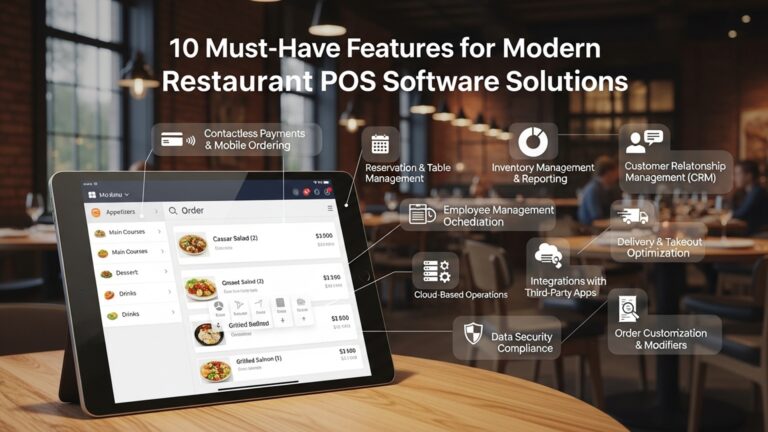
To truly streamline operations, a powerful restaurant POS with table management must offer a suite of robust features. These aren’t just add-ons; they are critical components that work in harmony to optimize every aspect of your dining room:
-
Real-time Floor Plan Customization
This feature allows restaurants to digitally recreate their exact dining room layout. Users can drag and drop tables, define sections. even account for different seating types (booths, high-tops, outdoor patio). The most advanced systems offer:
- Interactive Visuals
- Zone Management
A dynamic map showing table shapes, sizes. current status with color-coding (e. g. , green for vacant, red for occupied, yellow for nearing payment).
The ability to divide the dining area into specific zones for server assignments or special events.
-
Comprehensive Reservation & Waitlist Management
Beyond simple booking, an advanced system handles the entire guest journey:
- Online Booking Integration
- Automated Confirmations & Reminders
- Digital Waitlist
- Walk-in Management
Guests can book tables directly from your website or social media, with real-time availability updates.
Reducing no-shows through SMS or email alerts.
Guests added to a digital queue receive accurate wait time estimates and can be notified via text when their table is ready.
Seamlessly integrate walk-ins into the existing reservation flow, ensuring fair seating.
-
Guest Profile & CRM Integration
Personalization is key to loyalty. This feature allows staff to:
- Capture Guest Preferences
- Track Visit History
- Personalized Service
Note dietary restrictions, favorite tables, special occasions, or past orders.
Build a comprehensive profile of repeat customers.
Deliver tailored experiences that make guests feel valued.
-
Server Assignment and Rotation Optimization
Ensuring an even distribution of workload is vital for staff morale and service quality:
- Automated Server Rotation
- Workload Balancing
- Performance Tracking
Systems can automatically assign tables based on a pre-set rotation schedule.
Prevent certain servers from being overwhelmed while others are underutilized, leading to better tips and reduced stress.
Monitor server efficiency and table turn times.
-
Table Status Automation & Alerts
From the moment a guest is seated until the table is reset, the system tracks its journey:
- Lifecycle Tracking
- Automatic Updates
- Cleaning Alerts
From “seated” to “ordered” to “eating” to “paid” to “dirty” to “clean.”
As orders are placed and payments processed through the POS, table statuses update automatically.
Notify staff when a table is ready for bussing and cleaning, minimizing downtime.
-
Reporting and Analytics
Data is power. A robust system provides insights into:
- Table Turn Times
- Peak Hours & Days
- No-show Rates
- Server Performance
- Guest Demographics
Identify peak performance and areas for improvement.
interpret busiest periods for staffing and inventory.
Inform reservation policy adjustments.
Evaluate efficiency and contribution.
interpret your customer base better.
The Transformative Benefits of a Streamlined Approach
Implementing a powerful restaurant POS with table management isn’t just about digitizing processes; it’s about fundamentally transforming your restaurant’s efficiency, profitability. customer satisfaction. The benefits extend far beyond the front desk:
-
Enhanced Customer Experience
Guests today expect seamless service. A streamlined system delivers:
- Reduced Wait Times
- Personalized Service
- Smooth Flow
Accurate estimates and efficient seating mean less time spent waiting.
Access to guest profiles allows staff to anticipate needs and preferences, creating memorable dining experiences.
From reservation to seating to ordering, the entire process feels effortless for the diner.
“At ‘The Gilded Spoon,’ we used to have a 15-20 minute average wait on weekends, even with empty tables. After implementing our new POS with integrated table management, our wait times dropped to under 5 minutes. our customer satisfaction scores jumped by 18% in the first quarter,” shares Sarah Chen, General Manager of a popular upscale bistro.
-
Increased Operational Efficiency
For staff, the system provides clarity and tools for better performance:
- Faster Table Turns
- Optimized Staff Allocation
- Improved Communication
Real-time status updates and cleaning alerts minimize table downtime.
Managers can assign servers more effectively, ensuring balanced workloads and reducing stress.
Front-of-house (FOH) and back-of-house (BOH) are always in sync regarding table readiness and order status.
-
Boosted Revenue and Profitability
Direct impacts on the bottom line are significant:
- Maximized Seating Capacity
- Reduced No-shows
- Increased Order Accuracy
No more empty tables due to confusion; every available seat is utilized optimally.
Automated reminders significantly cut down on missed reservations.
Integration with the POS means fewer errors, less food waste. happier customers.
-
Data-Driven Decision Making
The wealth of data generated by the system is invaluable:
- Strategic Staffing
- Menu Optimization
- Performance Benchmarking
Use historical data on peak times and table turns to schedule staff more efficiently, reducing labor costs.
examine which tables turn fastest with certain menu items, informing future menu changes.
Track key metrics over time to identify trends and areas for continuous improvement.
Implementing a Restaurant POS with Table Management: A Strategic Blueprint
Transitioning to a powerful restaurant POS with table management requires careful planning and execution. Here’s a step-by-step guide to ensure a smooth and successful implementation:
-
1. Assess Your Current Needs and Challenges
Before looking at solutions, clearly define the problems you’re trying to solve. What are your biggest pain points with current table management? What features are non-negotiable? Consider:
- Number of tables and dining areas.
- Average daily covers and peak hour volume.
- Current reservation system (manual, third-party app).
- Staff roles and existing workflows.
-
2. Research and Vendor Selection
The market offers numerous POS systems. Look for vendors with a strong track record in the restaurant industry and robust table management features. Key considerations include:
- Scalability
- Integration Capabilities
- Ease of Use
- Customer Support
- Cost
Can the system grow with your business?
Does it integrate with online ordering, loyalty programs. accounting software?
Is the interface intuitive for your staff?
What kind of 24/7 support is offered?
grasp initial setup fees, monthly subscriptions. hardware costs.
-
3. Hardware and Software Setup
Once a vendor is chosen, the technical setup begins:
- Hardware Installation
- Software Configuration
- Network Connectivity
Install terminals, kitchen display systems (KDS), printers. network infrastructure.
Customize your floor plan, menu items, pricing, server roles. reservation rules within the POS system. This often involves uploading existing customer data or reservation lists.
Ensure stable and secure internet access, especially for cloud-based systems.
// Example of a basic floor plan configuration (simplified pseudocode) function configureFloorPlan(posSystem) { posSystem. addTable("Table 1", 4, "Booth", "Main Dining"); posSystem. addTable("Table 2", 2, "2-Top", "Main Dining"); posSystem. addTable("Table Patio A", 6, "Outdoor", "Patio"); posSystem. setTableCoordinates("Table 1", 50, 100); // X, Y coordinates for visual layout posSystem. defineZone("Main Dining", "Server A", "Server B"); posSystem. defineZone("Patio", "Server C"); posSystem. saveConfiguration(); } -
4. Comprehensive Staff Training
This is perhaps the most critical step. Even the best system is useless if staff don’t know how to use it. Provide:
- Hands-on Training
- Role-Specific Training
- Troubleshooting Basics
- Ongoing Support
Allow staff to practice with the system in a non-stress environment.
Hostesses, servers, managers. kitchen staff will all use different aspects of the system.
Equip staff to handle minor issues independently.
Designate internal “super-users” who can assist colleagues post-launch.
-
5. Go-Live and Post-Implementation Adjustments
Start with a “soft launch” during off-peak hours if possible. Be prepared for initial hiccups and provide immediate support. Gather feedback from staff and guests. be ready to make adjustments to workflows or system configurations based on real-world usage.
Choosing the Right Restaurant POS with Table Management System
Selecting the ideal restaurant POS with table management system is a strategic decision that impacts every facet of your operation. It’s not a one-size-fits-all solution; what works for a small café might not suffice for a multi-outlet fine dining establishment. Here’s a comparison of key factors to consider:
| Feature/Aspect | Basic/Entry-Level POS with Table Management | Advanced/Enterprise-Level POS with Table Management |
|---|---|---|
| Core Table Management | Simple table status (occupied/vacant), manual reservations. | Real-time interactive floor plan, automated waitlists, online reservations, guest profiles. |
| Integration Capabilities | Basic payment processing, limited third-party app integration. | Extensive APIs for online ordering, loyalty programs, inventory management, accounting, CRM. |
| Scalability | Suitable for single-location, smaller operations. | Designed for multi-location, high-volume restaurants; easily scalable with business growth. |
| Reporting & Analytics | Basic sales reports, table turn counts. | In-depth analytics on server performance, peak hours, no-show rates, guest demographics. |
| Customization | Limited floor plan and workflow customization. | Highly customizable floor plans, server rotations, reservation rules. user permissions. |
| Support & Training | Standard business hours support, self-help resources. | 24/7 dedicated support, on-site training, account manager. |
| Cost Structure | Lower upfront hardware cost, basic monthly subscription. | Higher initial investment, comprehensive subscription packages, potentially custom development fees. |
| Technology Stack | Often simpler, sometimes hardware-dependent. | Cloud-based, mobile-accessible, robust API infrastructure. |
When making your choice, prioritize systems that are intuitive for your staff, offer reliable support. provide the specific table management features that directly address your unique operational challenges and business goals. Always request a demo and speak to reference customers to gauge real-world performance.
Overcoming Common Challenges and Best Practices for Success
While the benefits of a restaurant POS with table management are clear, implementing any new technology can present challenges. Being prepared for these and adopting best practices can ensure a smoother transition and maximized ROI.
-
Challenge 1: Staff Resistance to Change
- Solution
-
Challenge 2: Data Migration and Setup Complexity
- Solution
-
Challenge 3: Technical Glitches and Downtime
- Solution
-
Challenge 4: Underutilization of Features
- Solution
Involve staff early in the decision-making process. Clearly communicate the ‘why’ behind the change – how it benefits them (e. g. , less stress, better tips, clearer communication). Provide thorough, hands-on training and celebrate early successes. Appoint ‘champions’ among your staff who can evangelize the new system and help peers.
Plan meticulous data migration. Work closely with your POS vendor to import existing reservations, guest profiles. menu items accurately. Dedicate sufficient time for floor plan setup and customization before go-live. A phased rollout, if possible, can help manage complexity.
Invest in reliable hardware and a stable internet connection. Ensure your POS vendor offers robust 24/7 technical support. Have a backup plan, such as a manual system for critical operations, in case of unexpected outages. Regularly update software and maintain hardware.
Continuous training and education are vital. Managers should regularly review reports and identify features that are not being fully leveraged. Conduct periodic refresher courses and share success stories within the team about how specific features have improved service or efficiency.
- Regular Performance Reviews
- Feedback Loops
- Stay Updated
- Integrate Fully
Utilize the system’s analytics to regularly review table turn times, server performance. guest feedback. Use this data to make continuous improvements.
Establish channels for staff to provide feedback on the system. Their insights from the front lines are invaluable for identifying areas for improvement or additional training.
The technology landscape evolves rapidly. Ensure your POS system is regularly updated to benefit from new features, security enhancements. performance improvements.
Maximize the benefits by integrating your table management with other POS functionalities like online ordering, loyalty programs. inventory management for a truly unified operation.
Conclusion
Embracing a powerful POS system for table management isn’t merely an upgrade; it’s a fundamental shift towards operational mastery. Gone are the days of chaotic paper reservations and mismanaged waitlists. My personal tip, based on observing countless restaurants, is to not just install a system but to truly master its digital floor plan. This isn’t just a visual aid; it’s a dynamic command center that, for example, allows for instantaneous table reassignments for a surprise large walk-in, drastically reducing bottlenecks and improving customer flow, a trend critical for urban eateries today. Beyond the immediate efficiency, these systems empower your staff, reducing their stress and allowing them to focus on genuine hospitality. I once saw a host effortlessly manage a 20-minute waitlist for a bustling Friday night simply because their POS provided real-time table turnover data. This proactive management, a key recent development, ensures guests aren’t just seated quickly. also feel valued. Empower your team by investing in comprehensive training, transforming your front-of-house into a seamless operation that fosters customer loyalty and boosts your profits. For further insights on overall system optimization, explore 10 Smart Strategies to Optimize Your Restaurant POS System Guide.
More Articles
10 Smart Ways Restaurant POS Software Can Improve Your Customer Service Today
Master 5 Smart Strategies to Boost Restaurant Efficiency with POS Systems
How To Choose The Best Restaurant POS System Essential Features Guide
Master 5 Common Restaurant Challenges With Smart POS Solutions

FAQs
What’s the biggest perk of using a powerful POS for managing my restaurant tables?
The main advantage is gaining complete control and a real-time overview of your entire dining area. You can see which tables are occupied, available, or about to finish, helping you seat guests faster and make smarter decisions on the fly.
How does a POS system make handling reservations and walk-ins easier?
It integrates both seamlessly. You can easily book tables for future reservations, mark them as confirmed. then allocate walk-ins to available tables without conflicting with existing bookings. It’s like having a digital maître d’ that keeps everything organized.
Can it really help prevent those annoying double bookings or tables sitting empty for too long?
Absolutely! With a real-time visual floor plan, the system prevents double bookings by showing you exactly what’s available. It also helps reduce empty tables by giving you insights into table turnover times, so you can estimate when a table will free up and seat your next guests more efficiently.
What if guests want to move tables or split their bill? Is that a hassle with a POS?
Not at all! A good POS system makes these tasks super simple. You can easily drag and drop guests from one table to another, combine tables for larger parties, or split checks by seat, item, or custom amounts with just a few taps. It’s designed for flexibility.
Does it speed up service during our busiest hours?
Definitely. By automating many manual tasks like tracking table status, managing waitlists. processing orders, your staff can focus more on customer service rather than scrambling with pen and paper. This leads to quicker table turns and a smoother flow, even when you’re packed.
How does it help manage waitlists effectively?
It provides a digital waitlist management feature. You can add guests, estimate wait times, send SMS notifications when their table is ready. easily assign them to the next available table. This keeps guests happy and reduces congestion at your entrance.
Is it complicated to train my staff to use this kind of system?
Modern POS systems are designed with user-friendliness in mind, often featuring intuitive touch interfaces and visual floor plans. Most staff can pick up the basics fairly quickly. many systems offer training resources to get your team up to speed with minimal fuss.