A Guide to Choosing the Best Restaurant POS Software for Your Business
The modern restaurant industry navigates unprecedented challenges, from persistent labor shortages to evolving customer expectations demanding seamless digital experiences. Consequently, a robust Restaurant POS software transcends its traditional role as a simple transaction processor, emerging as the indispensable central nervous system for any successful establishment. Today’s cutting-edge systems, leveraging cloud-based architecture, integrate everything from AI-driven inventory management and sophisticated table assignment to QR code ordering and personalized loyalty programs, optimizing operational efficiency. They empower businesses to streamline front-of-house service, manage back-of-house logistics. gather critical data for informed decision-making, directly impacting profitability and customer satisfaction in a competitive market.
Understanding Restaurant POS Software: More Than Just a Cash Register
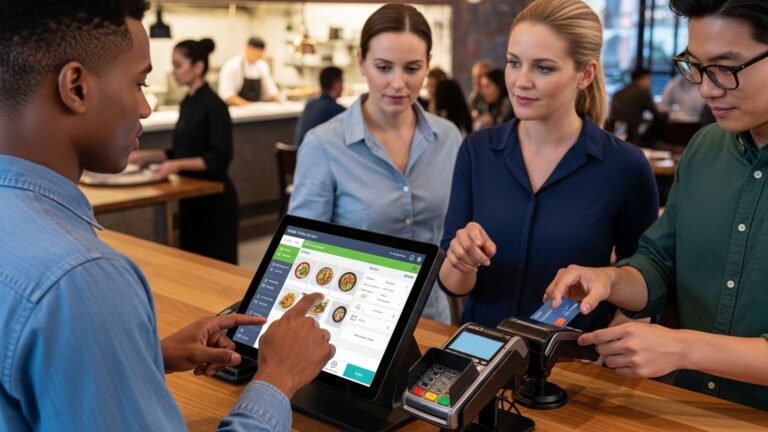
At the heart of every successful modern restaurant lies an efficient point-of-sale (POS) system. For many, the term “POS” might still conjure images of a clunky cash register. today’s Restaurant POS software is a sophisticated, integrated ecosystem designed to streamline operations, enhance customer experience. boost profitability. It’s no longer just about processing transactions; it’s about managing every aspect of your business, from inventory to staff, all from a centralized platform.
Historically, restaurants relied on manual systems for orders, inventory. bookkeeping. This led to errors, slow service. a lack of actionable data. The evolution to specialized Restaurant POS software has revolutionized the industry, offering a digital solution that automates these tasks, providing real-time insights and unparalleled control. Think of it as the central nervous system of your restaurant, connecting front-of-house (FOH) with back-of-house (BOH) operations seamlessly.
The core components of a modern Restaurant POS system typically include:
- Hardware
- Software
- Payment Processing
This encompasses the physical devices like touch-screen terminals, kitchen display screens (KDS), receipt printers, cash drawers. payment card readers.
This is the brain of the system, running on the hardware. It handles order entry, payment processing, inventory tracking, reporting. more. This is where the magic happens, transforming raw data into actionable insights.
Integrated directly into the software, this component securely handles credit card, debit card, mobile. other digital payments.
The right Restaurant POS software can significantly improve operational efficiency, reduce costly mistakes. provide invaluable data to make informed business decisions. For instance, imagine a bustling Friday night: orders flow from server tablets directly to the kitchen KDS, inventory updates in real-time. sales data is instantly available, showing you your best-selling dishes and peak hours.
Key Features to Look for in Restaurant POS Software
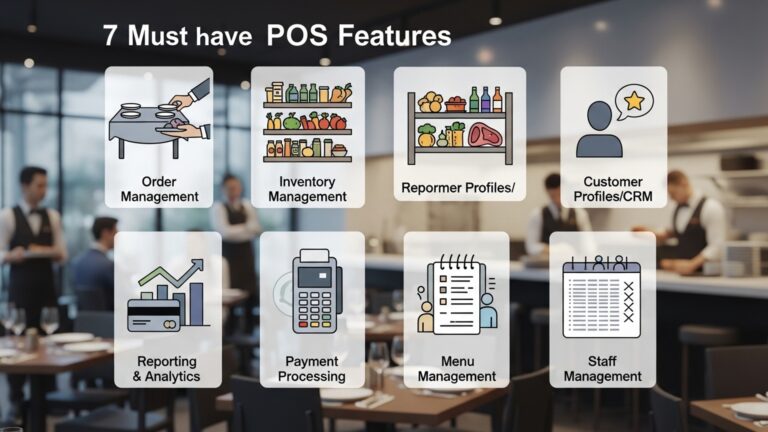
Choosing the best Restaurant POS software means identifying the features that align perfectly with your restaurant’s unique operational needs. A one-size-fits-all approach rarely works, so understanding the core functionalities is paramount.
- Order Management
- Table Management
- Split Checks & Item Transfers
- Modifiers & Customization
- Online Ordering Integration
- Inventory Management
- Real-time Tracking
- Vendor Management
- Recipe Management
- Waste Tracking
- Payment Processing
- EMV & Contactless Payments
- Mobile Payments
- Gift Card & Loyalty Programs
- Employee Management
- Time Clock & Payroll Integration
- Shift Scheduling
- Performance Tracking
- Permissions & Roles
- Customer Relationship Management (CRM)
- Customer Database
- Loyalty Programs
- Marketing Tools
- Reporting and Analytics
- Sales Reports
- Menu Item Performance
- Labor Cost Reports
- Inventory Reports
- Kitchen Display System (KDS) Integration
- Digital screens display orders for kitchen staff, reducing paper waste, improving communication. speeding up order prep.
- Often includes features for bumping orders, tracking prep times. managing multiple stations.
- Multi-location Management
- Centralized management for menus, pricing, inventory. reporting across multiple restaurant locations.
This is fundamental.
Intuitive visual layouts of your dining room, allowing staff to easily assign tables, track order status. manage reservations.
Essential for groups, enabling quick and accurate splitting of bills by item or evenly. transferring items between checks or tables.
The ability to easily add special requests (e. g. , “no onions,” “extra cheese,” “medium rare”) to orders, ensuring accuracy and reducing kitchen errors.
Seamlessly accepting orders placed through your website or a third-party platform directly into your POS.
A powerful tool for cost control.
Monitor ingredient levels as dishes are sold, preventing stockouts and over-ordering.
Track supplier insights, purchase orders. receiving.
Define recipes with ingredient portions to automatically deduct inventory items when a dish is sold, offering precise food costing.
Record spoiled or wasted items to get an accurate picture of food costs.
Secure and flexible options are non-negotiable.
Support for chip cards and tap-to-pay options (NFC), including Apple Pay and Google Pay, for speed and security.
Enabling customers to pay at the table using handheld devices, improving service speed.
Integrated systems for issuing, tracking. redeeming gift cards and rewarding loyal customers.
Optimize your workforce.
Track employee hours accurately and integrate with payroll systems to simplify processing.
Tools to create and manage staff schedules efficiently, often with employee access for shift swaps.
Monitor sales by server, average check size. other metrics to identify top performers and areas for improvement.
Define access levels for different staff roles to maintain security and control.
Build lasting relationships.
Store customer details, order history. preferences.
Create and manage points-based or discount loyalty programs to encourage repeat business.
Integrate with email marketing platforms to send promotions or special offers.
Data is power.
Detailed insights into daily, weekly. monthly sales, peak hours. average check size.
Identify best-selling dishes, slow movers. profit margins.
comprehend your labor expenses in relation to sales.
Track usage, waste. stock levels.
Modernize your kitchen workflow.
If you’re planning to grow.
Hardware Considerations for Your Restaurant POS System
While the software is the brain, the hardware forms the body of your Restaurant POS system. The right hardware ensures smooth operations, durability. a positive user experience for both staff and customers. It’s crucial to select hardware that is robust enough to withstand the demanding restaurant environment (spills, drops, continuous use) and compatible with your chosen Restaurant POS software.
- POS Terminals
- Touchscreen Monitors
- Tablets (e. g. , iPads, Android tablets)
- Printers
- Receipt Printers
- Kitchen Printers
- Cash Drawers
- Securely stores cash, typically connected directly to the POS terminal or receipt printer, opening automatically upon cash payment.
- Barcode Scanners
- If your restaurant sells merchandise, packaged goods (e. g. , a café selling coffee beans or branded items), or has a significant retail component, a barcode scanner will speed up checkout.
- Kitchen Display Screens (KDS)
- Digital screens that replace paper tickets, displaying orders for kitchen staff. They improve order accuracy, speed up prep times. allow for better communication between different stations.
- Payment Terminals/Card Readers
- Devices that accept credit, debit. mobile payments (EMV chip, NFC contactless). Some are integrated into the main terminal, while others are external or handheld for tableside payments.
- Networking Equipment
- Reliable Wi-Fi routers, network switches. Ethernet cabling are crucial for ensuring all your POS hardware components communicate effectively and maintain a stable connection, especially for cloud-based Restaurant POS software.
These are the primary workstations.
Often all-in-one units, these are highly intuitive for order entry. Look for screens that are spill-resistant and durable.
Offer mobility for tableside ordering and payment processing, enhancing efficiency and customer interaction. They are also cost-effective for smaller setups.
Essential for receipts and kitchen communication.
Thermal printers are common for speed and quiet operation, typically used at the front counter.
Impact printers are often preferred in hot, greasy kitchen environments as they are more resistant to heat and can print on thicker paper that is easier to read.
For cash transactions.
Useful for specific restaurant types.
Modernize your kitchen.
Secure transaction processing.
The backbone of connectivity.
When selecting hardware, consider the vendor’s recommendations for compatibility with their Restaurant POS software, as well as the ease of setup, maintenance. the availability of replacement parts.
Cloud-Based vs. On-Premise Restaurant POS Software: A Crucial Comparison
When diving into the world of Restaurant POS software, one of the most significant decisions you’ll face is whether to opt for a cloud-based (SaaS – Software as a Service) or an on-premise system. Each has its distinct advantages and disadvantages, impacting everything from initial cost to ongoing maintenance and accessibility. Understanding these differences is key to choosing the best fit for your restaurant.
| Feature | Cloud-Based Restaurant POS Software | On-Premise Restaurant POS Software |
|---|---|---|
| Definition | Software hosted on the vendor’s servers and accessed via the internet. Data is stored remotely. | Software installed directly on your restaurant’s local servers and computers. Data is stored on-site. |
| Initial Cost | Lower upfront cost, typically a monthly or annual subscription fee. Hardware might be purchased or leased. | Higher upfront cost due to purchasing software licenses, servers. potentially expensive installation. |
| Ongoing Costs | Predictable monthly/annual subscription fees. Includes updates, support. data backup. | Higher ongoing costs for IT maintenance, software updates, security patches. hardware upgrades. |
| Accessibility | Accessible from any internet-connected device (PC, tablet, smartphone) anywhere, anytime. Ideal for remote management. | Primarily accessible only from within the restaurant’s local network. Remote access usually requires complex VPN setups. |
| Data Backup & Security | Managed by the vendor in secure data centers. Automated backups are standard. Vendor is responsible for infrastructure security. | Your responsibility to manage backups and ensure robust on-site security measures. Requires dedicated IT knowledge. |
| Updates & Maintenance | Automatic software updates and upgrades rolled out by the vendor, often seamlessly. Minimal downtime. | Manual updates and patches required, often needing scheduled downtime and IT involvement. |
| Scalability | Highly scalable. Easily add or remove terminals, locations. features as your business grows or contracts. | Scalability can be complex and expensive, often requiring significant hardware upgrades and additional licenses. |
| Internet Reliance | Requires a stable internet connection for full functionality. Many offer offline modes with data syncing once connection is restored. | Operates independently of the internet for core functions once installed. Internet needed for external integrations (e. g. , online ordering, credit card processing). |
| Customization | Generally less customizable, relying on vendor-provided features and integrations. | Potentially more customizable to very specific needs. requires specialized IT development. |
For most modern restaurants, especially small to medium-sized businesses, cloud-based Restaurant POS software is often the preferred choice due to its lower upfront cost, ease of use, remote accessibility. automatic updates. But, businesses with highly specialized needs, stringent data control requirements, or a dedicated in-house IT team might still find value in an on-premise solution.
Integration Capabilities: Connecting Your Restaurant’s Ecosystem
In today’s interconnected business world, no software operates in a vacuum. The true power of modern Restaurant POS software lies in its ability to integrate seamlessly with other essential business applications. These integrations eliminate redundant data entry, improve data accuracy. provide a holistic view of your restaurant’s performance. When evaluating potential Restaurant POS software, always inquire about its integration ecosystem.
- Accounting Software
- Connecting your Restaurant POS software with platforms like
QuickBooks,
Xero, or
Sageautomatically transfers daily sales data, reducing manual input and potential errors. This streamlines reconciliation, tax preparation. financial reporting, giving you a clear picture of your profit and loss.
- Payroll Services
- Integrating with payroll providers (e. g. ,
ADP,
Gusto) allows employee time clock data from the POS to be directly fed into payroll calculations, simplifying wage processing and ensuring accurate payments based on hours worked and tips.
- Third-Party Delivery Platforms
- Seamless integration with services like
DoorDash,
Uber Eats,
Grubhub, or
SkipTheDishesmeans orders placed through these platforms flow directly into your POS system. This eliminates the need for staff to manually re-enter orders from multiple tablets, reducing errors and speeding up order processing.
- Loyalty and Marketing Tools
- Connecting with customer relationship management (CRM) systems or dedicated loyalty program platforms allows you to track customer purchase history, manage rewards. execute targeted marketing campaigns directly from the data gathered by your Restaurant POS software.
- Reservations Systems
- Integration with platforms like
OpenTableor
Resycan link reservation data directly with your table management system, providing a comprehensive view of your dining room’s availability and upcoming covers.
- E-commerce Platforms
- For cafes selling branded mugs or restaurants selling gourmet sauces, integrating with e-commerce platforms like
Shopifyensures inventory is synchronized and sales data is consolidated.
This is arguably one of the most critical integrations.
A must-have for many restaurants today.
Drive customer engagement.
For dining establishments that take bookings.
If you sell merchandise or packaged goods online.
Before committing to any Restaurant POS software, verify the specific integrations it offers and whether those align with the tools you currently use or plan to adopt. A robust integration strategy can save countless hours, minimize errors. provide invaluable insights into your entire restaurant operation.
Evaluating Vendor Support, Training. Scalability
The best Restaurant POS software isn’t just about features; it’s about the comprehensive ecosystem that surrounds it, including the quality of vendor support, the availability of training resources. the system’s ability to grow with your business. These aspects are often overlooked but are critical for long-term satisfaction and operational success.
- Vendor Support
- Availability
- Channels
- Response Time
- Expertise
- Customer Reviews
- Training Resources
- Onboarding Process
- Training Materials
- On-site vs. Remote
- Ease of Use
- Scalability for Growth
- Adding Terminals/Locations
- Feature Expansion
- Data Handling
- Hardware Compatibility
- Future-Proofing
When something goes wrong, you need help, fast.
Does the vendor offer 24/7 support, or are they limited to business hours? For a restaurant operating late nights or early mornings, 24/7 is often a necessity.
How can you reach them? Phone, email, live chat, or a ticketing system? Multiple options are ideal.
What are their guaranteed response times for critical issues? Look for vendors with a reputation for quick and effective problem resolution.
Are support staff knowledgeable specifically about Restaurant POS software and its unique challenges?
Check independent review sites (e. g. , Capterra, G2, Software Advice) for honest feedback on a vendor’s support quality. A common complaint about many systems, regardless of features, is poor support.
Empowering your team to use the system effectively.
What kind of initial setup and training does the vendor provide? Is it guided, or are you left to figure it out?
Look for comprehensive online knowledge bases, video tutorials, webinars. user manuals. These resources allow new staff to learn independently and existing staff to refresh their knowledge.
Does the vendor offer on-site training for larger installations, or is it primarily remote?
Even with training, the system should be intuitive. A complex system will lead to longer training times and more errors.
Your Restaurant POS software should grow with you.
If you plan to expand to multiple locations or add more POS stations, how easily can the system accommodate this? What are the associated costs?
Can you easily add new features (e. g. , loyalty programs, online ordering, KDS) as your needs evolve, or will you need to switch systems?
Can the system efficiently manage increasing volumes of sales data, customer insights. inventory as your business scales?
Will your existing hardware remain compatible, or will scaling require entirely new equipment?
Does the vendor regularly update their Restaurant POS software to incorporate new technologies and industry trends?
A personal anecdote here: I once worked with a restaurant that chose a seemingly robust POS system but neglected to check their support. When their internet went down on a busy Saturday night, rendering their cloud-based system unusable, they couldn’t reach anyone for hours. This costly downtime could have been mitigated with proper offline mode functionality and accessible 24/7 support. Always test the support channels during your trial period if possible!
Cost Factors: Understanding the Investment in Restaurant POS Software
Investing in Restaurant POS software is a significant financial decision. it’s crucial to grasp all the cost components involved, not just the advertised sticker price. A comprehensive view of the total cost of ownership (TCO) will help you budget accurately and avoid unwelcome surprises.
- Hardware Costs
- Terminals
- Peripherals
- Networking
- Initial Setup
- Software Subscription Fees
- Monthly/Annual Fees
- Tiered Plans
- Payment Processing Fees
- Transaction Fees
- Monthly Fees
- PCI Compliance Fees
- Gateway Fees
- Installation and Setup Fees
- Some vendors charge for initial setup, data migration (e. g. , importing your menu). on-site installation services.
- These can be one-time fees or included in higher-tier packages.
- Training Costs
- While many vendors offer basic training resources, extensive on-site training or customized sessions might incur additional costs.
- Maintenance and Support Fees
- For on-premise systems, this includes potential IT support contracts, software license renewals. security updates.
- For cloud-based Restaurant POS software, basic support and updates are usually included in the subscription. premium support tiers might be available for an extra charge.
- Hidden Costs to Watch Out For
- Integration Fees
- Reporting Customization
- Internet Service
- Contract Length
These are your upfront physical investments.
Touchscreen POS stations, tablets (iPads, Android), or traditional desktop computers.
Receipt printers, kitchen printers, cash drawers, barcode scanners, payment terminals (card readers), kitchen display screens (KDS).
Routers, switches, cables. potentially Wi-Fi extenders for larger spaces.
Costs associated with physically installing hardware and configuring your network.
The recurring cost for using the Restaurant POS software.
Most modern cloud-based systems operate on a subscription model. These can vary based on the number of terminals, features included (e. g. , advanced inventory, loyalty programs), or transaction volume.
Vendors often offer different tiers (e. g. , “Basic,” “Pro,” “Enterprise”) with varying features and support levels.
A critical ongoing expense.
A percentage (e. g. , 2. 5% + $0. 10) or flat fee per transaction. These can vary based on card type (credit vs. debit, premium cards), processing method (swiped vs. keyed-in). the processor.
Some processors charge a monthly fee in addition to transaction fees.
Small fees charged to ensure your system adheres to Payment Card Industry Data Security Standards.
For online transactions, a separate gateway fee might apply.
Getting your system up and running.
Equipping your team.
Keeping things running smoothly.
Some vendors charge extra for integrating with third-party apps (e. g. , specific accounting software, delivery platforms).
If you need highly specific, custom reports beyond what’s offered, there might be development costs.
A robust and reliable internet connection is essential, especially for cloud-based systems. its cost should be factored in. Consider a backup internet solution for critical operations.
Be aware of long-term contracts and early termination fees.
Always request a detailed quote that breaks down all these components. Don’t hesitate to negotiate, especially on transaction fees or bundled services. A clear understanding of these costs will ensure you make a financially sound decision for your Restaurant POS software investment.
Actionable Steps: How to Make Your Final Decision
Choosing the best Restaurant POS software for your business is a strategic decision that will impact your operations, profitability. customer satisfaction for years to come. By following a structured approach, you can narrow down your options and confidently select the system that’s right for you.
- Assess Your Specific Needs and Business Type
- Restaurant Type
- Size and Volume
- Budget
- Key Pain Points
- Create a Detailed Features Checklist
- Based on your needs assessment, list all the “must-have” features (e. g. , online ordering integration, real-time inventory, specific payment processing).
- Also, list “nice-to-have” features that would enhance operations but aren’t critical.
- Use this checklist to evaluate each potential Restaurant POS software vendor.
- Research and Shortlist Vendors
- Look for Restaurant POS software providers that specialize in your type of restaurant. Reputable names often include Toast, Square for Restaurants, Lightspeed, Clover. Revel Systems, among many others.
- Read industry reviews, expert comparisons. customer testimonials. Pay attention to feedback on customer support and system reliability.
- Aim for a shortlist of 3-5 vendors that seem to meet most of your criteria.
- Request Demos and Trials
- This is a crucial step. Schedule personalized demos with each shortlisted vendor. Have your key staff (managers, head chef, even a lead server) participate.
- Ask specific questions related to your operations. Can they demonstrate how to split a check, manage inventory for a specific dish, or run a sales report?
- If possible, request a free trial period. This hands-on experience is invaluable for testing the system in a real (or simulated) environment.
- During the demo/trial, test the user interface (UI) and user experience (UX). Is it intuitive for your staff?
- Talk to Other Restaurateurs
- Reach out to peers in the industry, especially those with similar restaurant concepts. Ask them about their experiences with different Restaurant POS software systems.
- Inquire about their satisfaction with vendor support, ease of use. any unexpected challenges they faced.
- Clarify All Costs and Contract Terms
- Get a detailed, itemized quote that includes all hardware, software, installation, training. ongoing fees (including payment processing rates).
- comprehend the contract length, renewal terms. any early termination clauses.
- Ask about data ownership and export capabilities if you ever decide to switch systems.
- Evaluate Integration Capabilities
- Ensure the chosen Restaurant POS software integrates seamlessly with your existing or planned accounting, payroll, online ordering. loyalty platforms. This will save immense time and prevent data silos.
- Make Your Decision and Plan Implementation
- Once you’ve weighed all factors, make your choice.
- Work closely with the vendor to plan the implementation process, including hardware installation, menu setup, staff training. go-live support.
Are you a fine dining establishment, a quick-service restaurant (QSR), a bar, a cafe, or a food truck? Each has different priorities (e. g. , table management for fine dining, speed for QSR).
How many tables, staff members. daily transactions do you anticipate? This influences hardware needs and software scalability.
Establish a realistic budget for both upfront hardware costs and ongoing software subscriptions/fees.
What problems are you trying to solve with a new POS? (e. g. , slow service, inventory waste, complex payroll, lack of data). Prioritize features that address these.
Remember, the goal is not just to buy a piece of technology. to invest in a solution that will simplify your operations, improve efficiency. ultimately contribute to your restaurant’s long-term success. A well-chosen Restaurant POS software becomes a powerful partner in achieving your business goals.
Conclusion
Choosing the ideal restaurant POS isn’t merely about ticking boxes; it’s about future-proofing your entire operation. Think beyond today’s transactions and visualize your business thriving with seamless order management, integrated online delivery. even AI-driven inventory insights – features now becoming standard. My personal tip? Always prioritize scalability and user-friendliness. I’ve seen too many businesses get stuck with rigid systems that stifle growth, much like a chef trying to innovate with outdated kitchen equipment. Therefore, dive into trials, ask probing questions about upcoming updates. consider how a system handles modern demands like contactless payments or integrated loyalty programs. The right POS, for instance, a cloud-based solution that effortlessly manages your busiest lunch rush while also providing real-time sales data, transforms challenges into opportunities. It’s an investment in efficiency and, ultimately, your peace of mind. Make that informed decision and empower your restaurant to flourish in the dynamic culinary landscape. For a deeper dive into specific functionalities, explore how to select essential POS features that truly boost efficiency.
More Articles
Master Restaurant Operations 8 Smart Strategies Using POS Software Daily
Learn 10 Smart Ways Restaurant POS Software Can Improve Your Profits
Implement Restaurant POS Like a Pro 5 Essential Strategies for Smooth Rollout
10 Must-Have Features for Modern Restaurant POS Software Solutions
How to Seamlessly Integrate POS Software with Your Kitchen Display System

FAQs
Why is a good POS system so essential for my restaurant?
A good Point-of-Sale (POS) system does way more than just process payments. It helps manage orders, inventory, staff. customer data, making your operations smoother and more efficient. It can seriously boost your speed, reduce errors. give you valuable insights to make smarter business decisions.
What are the absolute must-have features I should look for in restaurant POS software?
Definitely look for robust order management (table service, takeout, delivery), inventory tracking, employee management (timesheets, permissions), reporting and analytics. payment processing. Integrations with online ordering platforms and kitchen display systems (KDS) are also huge pluses.
How do I figure out if a POS system fits my specific restaurant type – like a coffee shop versus a fancy diner?
Think about your unique needs. A coffee shop might prioritize speed and loyalty programs, while a fine dining spot needs detailed table management and reservation integration. Look for systems that offer customizable menus, specific order workflows (e. g. , coursing for fine dining, quick modifiers for coffee). tailored reporting for your operational style.
Is restaurant POS software super expensive. how does pricing usually work?
The cost varies a lot! Most systems use a subscription model, charging a monthly or annual fee based on the number of terminals or locations. There might also be upfront hardware costs, installation fees. transaction processing rates. Always get a clear breakdown of all potential costs before committing.
How easy is it for my staff to learn and use these systems? I don’t want a huge training headache.
User-friendliness is key! Look for intuitive interfaces with minimal clicks to complete tasks. Many modern systems are designed to be very visual and easy to pick up, often similar to using a tablet or smartphone. Ask for demos and even trial periods to see how easily your team adapts. Good training resources from the vendor are also a big plus.
What kind of support should I expect from a POS vendor if something goes wrong?
Reliable support is critical, especially when you’re busy. Look for vendors offering 24/7 support, multiple contact methods (phone, chat, email). a good reputation for quick problem resolution. Check reviews to see how responsive and helpful their support team truly is.
Can these POS systems connect with my other business tools, like accounting software or my online ordering platform?
Absolutely, integration is a major benefit! The best POS systems offer seamless connections with various third-party applications, including popular accounting software (like QuickBooks or Xero), online ordering platforms, loyalty programs. even delivery services. This avoids manual data entry and keeps all your systems talking to each other.