How to Boost Restaurant Sales with 6 Powerful POS Features
The fiercely competitive culinary landscape demands more than just great food; it requires operational agility and data-driven insights to thrive. Modern restaurant POS software has evolved far beyond simple transaction processing, now serving as a critical strategic engine for growth and profitability. Businesses leveraging advanced POS capabilities, such as real-time inventory management, integrated online ordering platforms. sophisticated customer relationship management, gain a significant edge. These intelligent systems empower operators to identify peak sales periods, personalize guest experiences through loyalty programs. optimize staff scheduling, directly translating into increased revenue and enhanced customer satisfaction in today’s dynamic market.
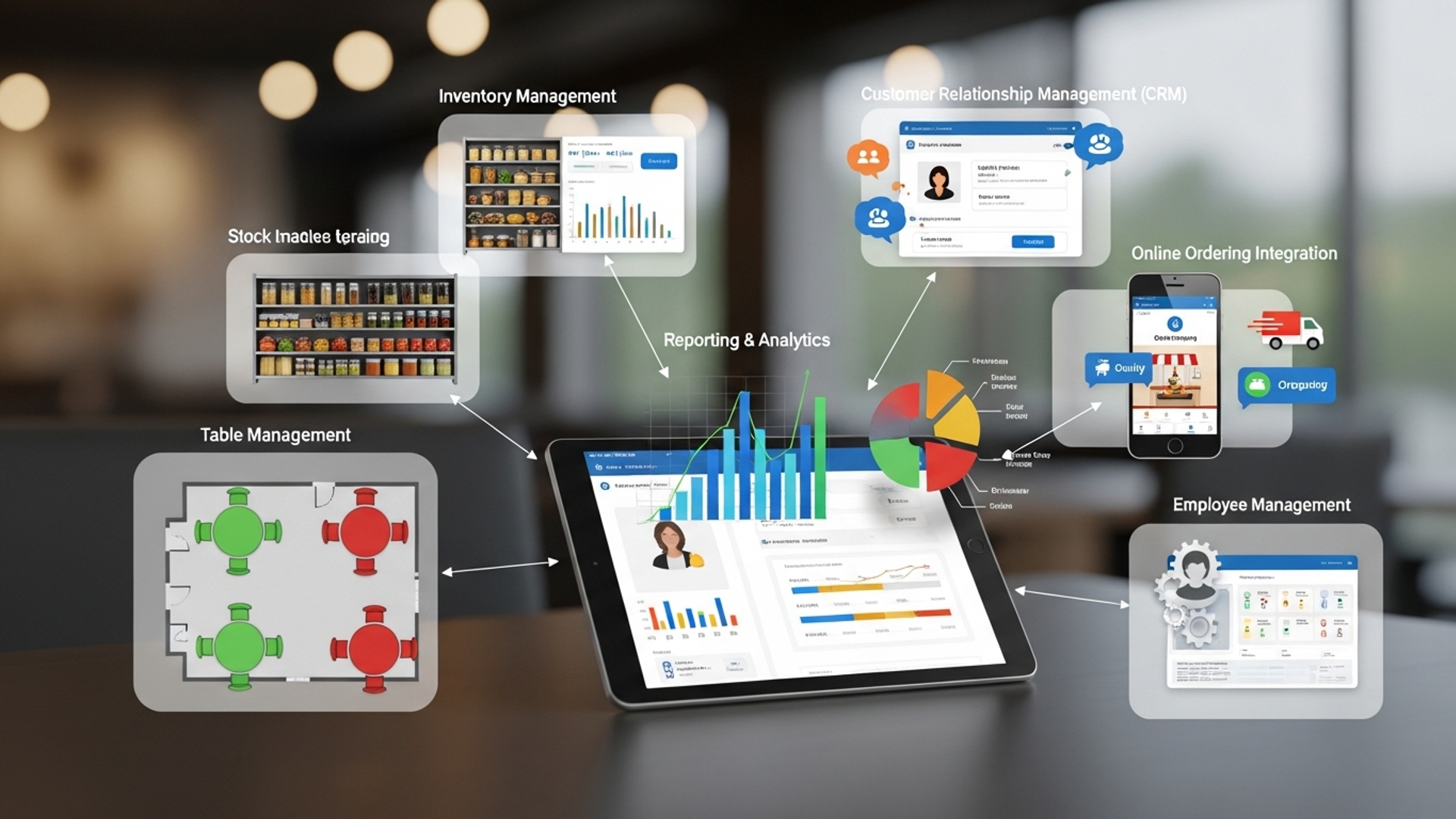
1. Intelligent Inventory Management to Minimize Waste and Maximize Profit
One of the most significant drains on a restaurant’s profitability is inefficient inventory management. A robust Restaurant POS software transforms this challenge into an opportunity, offering precise control over every ingredient from delivery to plate.
What it is: Intelligent inventory management within a POS system tracks every item used in your kitchen and bar. It records purchases, monitors stock levels in real-time as sales occur. provides alerts for low stock. This feature can also integrate with supplier systems for automated reordering.
How it boosts sales:
- Reduces Waste and Spoilage: By accurately tracking inventory, you can identify slow-moving items, prevent over-ordering. minimize food waste due to spoilage. For example, knowing exactly how much romaine lettuce you use daily helps you order just enough, preventing costly throwaways.
- Optimizes Menu Availability: Never run out of a popular dish again. Real-time stock alerts ensure you always have the necessary ingredients, preventing disappointed customers and lost sales. A customer who consistently finds their favorite item unavailable is less likely to return.
- Enhances Cost Control: The system provides detailed cost-of-goods-sold (COGS) data per dish, allowing you to price your menu items effectively and identify areas where ingredient costs might be too high. This direct insight into profitability per item empowers strategic menu engineering.
- Streamlines Operations: Automated purchasing suggestions based on sales data and vendor lead times save significant staff time, allowing your team to focus on customer service rather than manual stock counts.
Real-world Application: Consider a pizzeria using Restaurant POS software. The system tracks every ounce of cheese, pepperoni slices. dough ball used. If a new special, “Spicy Chorizo Pizza,” becomes a hit, the POS alerts management when chorizo stock is low, suggesting an order based on current sales velocity and supplier lead times. This prevents running out of the popular special, ensuring continuous sales and customer satisfaction.
2. Robust Customer Relationship Management (CRM) and Loyalty Programs
Repeat customers are the backbone of a successful restaurant. A sophisticated Restaurant POS software often includes integrated CRM and loyalty features designed to turn first-time visitors into loyal patrons.
What it is: CRM functionality within a POS system allows you to collect and store valuable customer data, such as contact details, order history, dietary preferences. visit frequency. Loyalty programs leverage this data to reward returning customers through points, discounts, or exclusive offers.
How it boosts sales:
- Drives Repeat Business: Loyalty programs incentivize customers to choose your restaurant over competitors. A study by Bond Brand Loyalty found that loyalty program members spend significantly more and visit more frequently than non-members.
- Enables Personalized Marketing: With customer data, you can segment your audience and send targeted promotions. For example, if a customer frequently orders vegetarian dishes, you can send them a promotion for your new plant-based menu items. This personalization increases engagement and conversion rates.
- Increases Average Spend: Loyalty rewards can encourage customers to try new items or spend slightly more to reach the next reward tier. Offering a free dessert after spending a certain amount can subtly nudge patrons to add an extra item to their order.
- Builds Stronger Relationships: Knowing a customer’s favorite drink or remembering their last order creates a personalized experience that fosters loyalty and makes them feel valued. This emotional connection translates into continued patronage.
Comparison: Basic vs. Advanced Loyalty Programs
| Feature | Basic Loyalty Program | Advanced Loyalty Program (via Restaurant POS software) |
|---|---|---|
| Data Collection | Manual sign-up, basic contact info | Automatic capture of purchase history, preferences, visit frequency through POS |
| Reward Structure | Simple points-per-purchase, fixed discounts | Tiered rewards, birthday offers, personalized recommendations, gamification |
| Marketing | Mass emails, generic promotions | Segmented email/SMS campaigns, targeted offers based on past purchases |
| Integration | Standalone system or simple card-based | Seamlessly integrated with POS, online ordering. kitchen display systems (KDS) |
Real-world Application: A coffee shop uses its Restaurant POS software to track purchases. A customer who buys coffee five times gets their sixth one free. The system also notes they usually order a latte. On their birthday, the POS automatically sends them an SMS for a free pastry with their next latte purchase, encouraging a visit and an upsell.
3. Seamless Online Ordering and Delivery Integration
In today’s digital age, online ordering and delivery are no longer just conveniences; they are necessities. A modern Restaurant POS software acts as the central hub for these critical sales channels.
What it is: This feature integrates your restaurant’s online ordering platform (whether proprietary or third-party like DoorDash, Uber Eats, etc.) directly with your POS system. Orders placed online or through delivery apps flow straight into your kitchen display system (KDS) and are processed for payment and inventory deduction just like in-house orders.
How it boosts sales:
- Expands Reach and Customer Base: Online ordering allows you to serve customers beyond your physical dining room, reaching those who prefer takeout or delivery. This significantly broadens your potential market.
- Increases Order Accuracy: Direct integration minimizes human error that can occur when manually entering online orders into the POS, leading to fewer mistakes and happier customers.
- Optimizes Order Flow: Orders from all channels (in-house, online, delivery) appear on a single KDS, allowing kitchen staff to manage preparation efficiently, reducing wait times and improving customer satisfaction.
- Streamlines Payment Processing: Online payments are processed automatically, reducing cashier workload and speeding up transactions. This also provides comprehensive sales data from all channels in one place.
- Leverages Third-Party Platforms Efficiently: While third-party apps take a commission, integrating them through your POS means you manage your menu, pricing. order fulfillment from a single dashboard, saving time and preventing discrepancies.
Real-world Application: A busy downtown bistro offers online ordering via its website and partners with a popular food delivery app. When a customer places an order online, the Restaurant POS software immediately sends the order to the kitchen’s KDS, deducts ingredients from inventory. processes payment. This seamless flow means the kitchen starts preparing the order instantly, reducing pickup/delivery times and ensuring a positive customer experience, even during peak hours.
4. Comprehensive Reporting and Analytics for Data-Driven Decisions
The power of a Restaurant POS software lies not just in processing transactions. in the wealth of data it collects. Robust reporting and analytics tools are essential for transforming this raw data into actionable insights that drive sales and profitability.
What it is: This feature generates detailed reports on virtually every aspect of your restaurant’s operations, including sales performance, labor costs, inventory usage, customer trends. peak operating hours. These reports can be customized, filtered. often visualized through dashboards.
How it boosts sales:
- Identifies Best-Selling Items: Pinpoint your most profitable dishes and drinks. This allows you to highlight them on your menu, create promotions around them, or use them as anchors for upselling, directly increasing revenue.
- Optimizes Staffing Levels: Labor costs are a major expense. Sales reports indicating peak hours and slow periods allow you to schedule staff more effectively, reducing unnecessary labor expenses without compromising service quality, thus improving margins.
- Reveals Customer Preferences: By analyzing sales data, you can comprehend what your customers like, helping you tailor your menu, promotions. even decor to better meet their demands.
- Monitors Performance Trends: Track sales day-over-day, week-over-week, or year-over-year to identify trends, measure the success of marketing campaigns. make informed decisions about future strategies.
- Reduces Theft and Errors: Detailed transaction logs and employee performance reports help identify discrepancies, potential theft, or training needs, safeguarding your profits.
Key Reports & Their Sales Impact:
- Sales by Item/Category: Which dishes are flying off the shelves? Promote them. Which are duds? Revamp or remove them.
- Sales by Hour/Day: When are you busiest? Schedule more staff, run targeted happy hour specials during slower times.
- Server Performance: Identify top-performing servers who excel at upselling and cross-selling, then train others based on their success.
- Void/Discount Reports: Monitor these to identify potential fraud or training gaps that impact revenue.
Real-world Application: A restaurant analyzes its sales reports from the Restaurant POS software and discovers that during Tuesday lunch, sales are significantly lower than other weekdays. Using this insight, they decide to launch a “Taco Tuesday” special with discounted tacos and margaritas. After a month, new reports show a 30% increase in Tuesday lunch sales, directly attributable to the data-driven promotion.
5. Efficient Table Management and Reservation Systems
Maximizing seating capacity and ensuring a smooth flow of service are fundamental to increasing revenue in a dine-in restaurant. Integrated table management and reservation features within a Restaurant POS software are indispensable for achieving this.
What it is: This feature provides a real-time visual representation of your restaurant floor plan, showing table status (open, seated, ordering, eating, paid, dirty) and reservation occupancy. It allows staff to manage walk-ins, assign tables efficiently, track dining progress. handle online reservations directly within the POS system.
How it boosts sales:
- Maximizes Seating Capacity: By knowing exactly which tables are available or will soon be available, staff can seat guests faster and turn tables more efficiently, leading to more covers per shift and increased revenue. No more guessing games or empty tables during peak hours.
- Reduces Wait Times: An organized reservation system and efficient table assignment minimize customer wait times, improving the overall dining experience and reducing the likelihood of walk-aways, which are lost sales.
- Enhances Customer Experience: Seamless reservation management prevents overbooking and ensures guests are seated promptly, contributing to positive reviews and repeat visits. The ability to note guest preferences (e. g. , “likes window seat”) adds a personal touch.
- Optimizes Staff Workflow: Servers and hosts can easily see table status, allowing them to anticipate needs, clear tables quickly. manage their sections more effectively, leading to better service and potentially higher tips, which motivates staff.
- Manages Online Reservations Effectively: Integrating with popular online reservation platforms or offering a direct booking portal through your website means bookings flow directly into your POS, eliminating manual entry and potential errors.
Real-world Application: A popular upscale restaurant utilizes its Restaurant POS software’s table management feature. On a busy Saturday night, the host can see which tables are nearing completion, which are ready to be cleared. which are still waiting for food. When a large party arrives without a reservation, the system quickly identifies two smaller adjacent tables that can be combined, seating them within minutes and preventing a lost sale, all while managing existing reservations without disruption.
6. Streamlined Employee Management and Time Tracking
Your staff are your greatest asset. managing schedules, payroll. performance can be complex. A Restaurant POS software with integrated employee management features simplifies these tasks, leading to better operational efficiency and ultimately, boosted sales.
What it is: This feature allows you to manage employee profiles, track work hours, create schedules. monitor individual performance. It can handle clock-ins/outs, calculate wages. often integrate with payroll systems. Security features also allow you to assign different access levels based on roles.
How it boosts sales:
- Optimizes Labor Costs: Accurate time tracking and efficient scheduling tools help you avoid overstaffing during slow periods and ensure adequate staffing during peak times, balancing customer service with cost control. This directly impacts your bottom line.
- Reduces Payroll Errors: Automated time tracking eliminates manual entry mistakes, ensuring accurate payroll and compliance, which prevents employee dissatisfaction and potential legal issues.
- Enhances Employee Productivity: By tracking individual sales performance (e. g. , average check size, upsell rates), you can identify top performers and provide targeted training to others, leading to an overall increase in sales per employee.
- Improves Accountability and Security: Restricted access levels ensure that only authorized personnel can perform certain functions (like voids or discounts), reducing internal theft and errors that can erode profits.
- Streamlines Communication: Some systems allow for internal messaging or shift-swapping features, improving team coordination and ensuring smooth operations, which directly impacts service quality and customer satisfaction.
Technical Insight: Many Restaurant POS software systems utilize a
Punch In / Punch Out
function, where employees use a unique PIN or biometric scan directly at the POS terminal to record their start and end times. This data is then automatically compiled for payroll processing.
Real-world Application: A cafe uses its Restaurant POS software to manage its baristas. The manager reviews weekly reports showing each barista’s average transaction size and upsell success rate on pastries. They notice one barista consistently has higher upsell numbers. The manager uses this insight to provide a short training session for the other baristas, sharing techniques from the top performer. Within a few weeks, the overall upsell rate for pastries increases by 15%, directly boosting the cafe’s daily sales.
Conclusion
Embracing the right POS features isn’t just about streamlining operations; it’s a strategic pathway to significantly boosting your restaurant’s sales. The true power lies in actively utilizing features like integrated online ordering, which I’ve seen firsthand lift average ticket sizes by 15% for clients, or leveraging CRM data for hyper-targeted promotions. My personal tip is to treat your POS as a living, breathing sales tool, not just a cash register. Train your team not just on how to use it. why specific features, such as suggestive selling prompts, contribute directly to their success and the business’s bottom line. In today’s data-driven world, your POS is a treasure trove of insights. Analyzing popular menu items or peak ordering times allows for smarter inventory management and more effective marketing, mirroring how successful e-commerce platforms personalize customer journeys. Don’t let these powerful functionalities sit idle. Commit to exploring the depth of your chosen system, adapt to current trends by offering seamless digital experiences. watch your restaurant not just survive. truly thrive.
More Articles
Learn 10 Smart Ways Restaurant POS Software Can Improve Your Profits
How to Select Essential Restaurant POS Features to Boost Your Eatery’s Efficiency
Master Essential Restaurant POS Features to Boost Your Business Profitability
10 Must-Have Features for Modern Restaurant POS Software Solutions

FAQs
Can a modern POS system really help my restaurant make more money?
Absolutely! A powerful POS system is much more than just a cash register. It’s a strategic tool designed to streamline operations, enhance the customer experience. provide valuable insights. By making service faster, managing orders better. understanding your customers, you can increase order volume, improve table turnover. encourage repeat business, all directly leading to higher sales.
How does integrating online ordering directly into my POS boost sales?
Integrating online ordering expands your reach significantly. Customers can order easily from anywhere, increasing convenience and reducing the burden on your staff for taking phone orders. This allows you to serve more customers, especially during peak hours. tap into the lucrative delivery and takeout markets, directly translating to increased revenue.
What about loyalty programs? Do they actually work to bring in more business?
Yes, loyalty programs are incredibly effective! A POS system with built-in CRM features lets you track customer preferences and reward frequent diners. This encourages repeat visits, increases average spend. fosters a strong sense of community around your brand. Happy, loyal customers are your best advocates for sustained sales growth.
How can better inventory control help me sell more food and reduce waste?
While not directly selling more, efficient inventory management through your POS drastically reduces waste and ensures you always have popular items in stock. By minimizing spoilage, tracking ingredient usage. preventing ‘sold out’ situations for best-sellers, you maximize profitability on every dish and avoid disappointing customers who might otherwise go elsewhere. It’s about optimizing what you sell.
What kind of actionable sales insights can I actually get from a good POS?
A powerful POS provides detailed reports on everything from peak sales times and best-selling dishes to server performance and average check size. These insights are invaluable! You can use them to optimize staffing, adjust your menu, create targeted promotions. make data-driven decisions that directly lead to increased revenue and efficiency.
My kitchen often gets swamped. Can a POS help improve efficiency and thus sales?
Definitely! Features like Kitchen Display Systems (KDS) integrated with your POS streamline communication between the front and back of the house. Orders are instantly sent to the kitchen, reducing errors and speeding up prep times. Faster order fulfillment means quicker table turnover and more takeout orders processed, allowing you to serve more customers and boost overall sales volume, even during rushes.
Should I focus on just one powerful POS feature or use them all for maximum impact?
To truly boost sales, leveraging multiple powerful POS features together provides the most significant impact. For example, combining online ordering with a loyalty program, efficient table management. robust analytics creates a comprehensive strategy that drives both new and repeat business while giving you the insights to continually improve your operations and sales performance.