5 Crucial Questions to Ask When Choosing Restaurant POS Software
Selecting the right restaurant POS software is no longer a mere operational upgrade; it’s a strategic investment defining a restaurant’s future agility and profitability. In an era dominated by rapid digital transformation and evolving customer expectations, a robust restaurant POS software ecosystem extends beyond simple transaction processing, integrating everything from inventory management and table-side ordering to advanced CRM and real-time analytics. Modern platforms now leverage AI for predictive ordering and offer seamless integrations with third-party delivery services, making the choice a complex decision demanding careful consideration of scalability, security. true operational intelligence. Failing to ask the right questions can lead to costly inefficiencies and hinder growth in a highly competitive market.
1. Does the Restaurant POS Software Offer Scalability and Seamless Integration?
When you’re evaluating restaurant POS software, one of the most critical considerations is its ability to grow with your business and integrate smoothly with your existing or future tech stack. A point-of-sale system isn’t just about processing transactions; it’s the central nervous system of your restaurant. Choosing a solution that can’t scale or integrate effectively can lead to significant bottlenecks and costly overhauls down the line.
Understanding Scalability
Scalability refers to the software’s capacity to handle an increasing workload or expand its functionality as your business grows. Consider these aspects:
- Multi-Location Management
- User Accounts & Permissions
- Increased Transaction Volume
If you envision opening more branches, can the software centrally manage menus, inventory, pricing. reporting across all locations? This is crucial for maintaining brand consistency and operational efficiency.
Can you easily add new staff members, define roles. set specific permissions as your team expands?
Will the system slow down or crash during peak hours or as your customer base grows? Look for systems built on robust infrastructure.
The Power of Integration
Modern restaurant operations rely on a suite of specialized tools. Your restaurant POS software should not exist in a silo. Seamless integration means your POS can “talk” to other essential platforms, sharing data and streamlining workflows. Key integrations to look for include:
- Payment Processors
- Online Ordering Platforms
- Inventory Management Systems
- Customer Relationship Management (CRM)
- Accounting Software
- Employee Scheduling/Payroll
Does it support various payment options (contactless, mobile, EMV) and integrate with your preferred payment gateway?
Essential for delivery and takeout, a direct integration ensures orders flow straight to the kitchen display system (KDS) without manual re-entry.
Real-time updates on stock levels based on sales data prevent waste and ensure you never run out of popular items.
Track customer preferences, loyalty points. purchase history to personalize experiences and drive repeat business.
Automatically sync sales data, payroll. expenses to streamline bookkeeping and reduce errors.
Integrate sales data with labor costs to optimize staffing levels and simplify payroll processing.
Imagine a bustling coffee shop owner, Sarah, who initially chose a basic POS. As her business grew, she wanted to add online ordering and a loyalty program. Her initial POS couldn’t integrate with either, forcing her staff to manually input online orders and manage loyalty points on a separate system. This led to errors, wasted time. frustrated customers. A scalable, integrated solution would have allowed her to expand seamlessly, saving time and improving customer satisfaction.
2. What Core Features and Functionality Does the Restaurant POS Software Offer?
Beyond basic transaction processing, the feature set of your chosen restaurant POS software will dictate your operational efficiency and customer experience. It’s crucial to identify the specific functionalities that are non-negotiable for your unique restaurant model, whether it’s a fine-dining establishment, a quick-service cafe, or a food truck.
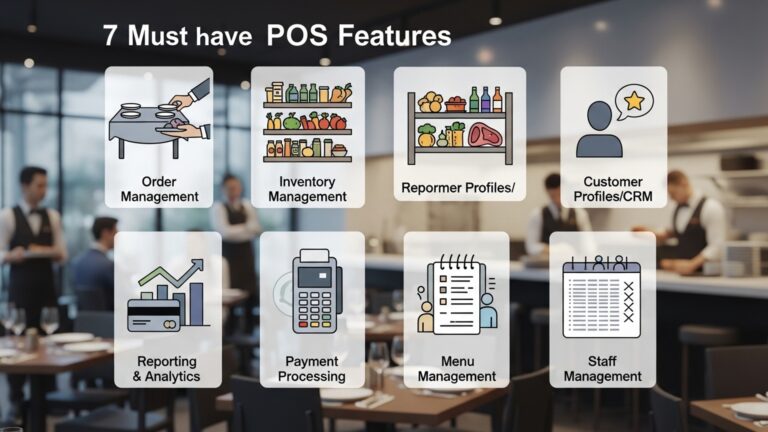
Essential Front-of-House Features
- Intuitive Order Entry
- Table Management
- Kitchen Display System (KDS) Integration
- Customer-Facing Displays
- Mobile Ordering/Pay at Table
Easy-to-navigate menus, modifiers (e. g. , “extra cheese,” “no onions”). split-check functionality are vital for speedy service.
For full-service restaurants, visual table layouts, status tracking (seated, ordered, paid). easy table transfers are indispensable.
Sends orders directly to the kitchen, improves communication, reduces errors. speeds up prep times.
Allows customers to review orders and tips, enhancing transparency and reducing disputes.
Enables servers to take orders tableside on handheld devices or allows customers to pay directly from their phones.
Crucial Back-of-House Features
- Advanced Inventory Management
- Employee Management
- Reporting and Analytics
- Menu Management
Track ingredients down to the unit, manage suppliers, set reorder points. minimize waste. Some systems even offer recipe costing.
Time clock functionality, shift management, performance tracking. tip distribution.
Comprehensive reports on sales trends, popular items, peak hours, labor costs. more. This data is gold for making informed business decisions.
Easily update menu items, pricing, specials. availability across all channels.
Specialized Functionality for Different Restaurant Types
The “best” features depend on your specific needs. Here’s a brief comparison:
| Restaurant Type | Key POS Features |
|---|---|
| Full-Service Dining | Table management, detailed modifiers, split checks, server handhelds, reservation system integration. |
| Quick Service/Café | Fast order entry, combo meal support, drive-thru management, loyalty programs, self-ordering kiosks. |
| Bar/Pub | Tab management, age verification, happy hour pricing, inventory for spirits/beer, quick reorder buttons. |
| Pizza/Delivery | Delivery management (driver tracking, mapping), order customization, caller ID integration, online ordering. |
Don’t pay for features you don’t need. also don’t compromise on critical ones. A demo is essential to see how these features actually work in practice.
3. What is the Total Cost of Ownership and What Level of Support Can I Expect?
The price tag on restaurant POS software is rarely just the upfront cost. Understanding the total cost of ownership (TCO) and the quality of support is vital to avoid budget surprises and ensure operational continuity. A cheap system with poor support can end up being far more expensive in the long run due to downtime and inefficiency.
Deconstructing the Total Cost of Ownership (TCO)
TCO includes all expenses associated with acquiring, operating. maintaining the POS system over its lifespan. Beyond the initial software license or subscription, consider:
- Hardware Costs
- Subscription Fees
- Payment Processing Fees
- Installation and Setup Fees
- Training Costs
- Maintenance and Updates
- Add-ons and Integrations
POS terminals, receipt printers, cash drawers, kitchen display screens, card readers, handheld devices. These can be purchased outright or leased.
Most modern POS systems operate on a Software-as-a-Service (SaaS) model, requiring monthly or annual fees. interpret what’s included in different tiers.
Often overlooked, these can be a significant recurring cost. Compare rates, transaction fees. any hidden charges.
Does the vendor charge for initial setup, data migration, or hardware installation?
Will you need to pay for staff training sessions?
Are software updates included in the subscription, or are there additional fees? What about hardware maintenance?
Some advanced features or third-party integrations might come with extra costs.
Always request a detailed breakdown of all potential costs for at least 3-5 years, not just the first year. This will give you a clearer picture of your investment.
Assessing Customer Support and Reliability
When something goes wrong – and in a busy restaurant, it inevitably will – reliable support is non-negotiable. Downtime means lost sales and frustrated customers. Ask about:
- Availability
- Support Channels
- Response Times
- On-Site Support
- Training Resources
- Reputation
Is support 24/7, or only during business hours? What about holidays? A restaurant operates beyond standard 9-5.
Phone, email, live chat, knowledge base, dedicated account manager? The more options, the better.
What are the guaranteed response times for critical issues?
Is local or on-site support available for hardware issues if needed?
Are there extensive online tutorials, webinars, or documentation to help staff learn and troubleshoot?
Check independent reviews and industry forums for feedback on the vendor’s support quality. A quick search for “POS vendor X support reviews” can be very enlightening.
A small family diner invested in a low-cost POS system. While initially attractive, they soon discovered the support was only available via email during weekdays. When their system crashed during a busy Saturday brunch service, they had no immediate help, leading to hours of manual order taking, frustrated customers. significant lost revenue. This highlights the critical importance of robust, accessible support for any restaurant POS solution.
4. How Easy Is the Software to Use and What is the Training Process Like?
I once worked at a restaurant that switched to a new POS system. The system was powerful but incredibly complex. The vendor provided a single, overwhelming 3-hour training session for all staff. Without clear, accessible follow-up materials or a practice mode, new hires struggled immensely, leading to constant errors, long queues. significant stress for the entire team. It took months for staff to become truly proficient, highlighting the cost of poor training support.
5. How Secure and Reliable Is the Restaurant POS Software?
In today’s digital landscape, data security and system reliability are not optional; they are fundamental. When choosing restaurant POS software, you’re entrusting a vendor with sensitive customer payment details, sales data. potentially employee records. A breach or system failure can have catastrophic consequences for your business’s reputation, finances. legal standing.
Data Security Protocols
Your POS system handles sensitive customer data, including credit card insights. Ensure the vendor adheres to industry best practices and compliance standards:
- PCI DSS Compliance
- Encryption
- Tokenization
- User Access Control
- Regular Security Audits
- Cloud Security
This is non-negotiable. The Payment Card Industry Data Security Standard (PCI DSS) is a set of security standards designed to ensure that all companies that process, store, or transmit credit card details maintain a secure environment. Ask for proof of compliance.
How is data encrypted, both in transit (when it’s being sent between devices or to the cloud) and at rest (when it’s stored on servers)? Look for strong encryption standards like AES-256.
Instead of storing actual credit card numbers, tokenization replaces sensitive data with a unique, non-sensitive identifier (a “token”). This significantly reduces the risk in case of a breach.
Robust role-based permissions ensure that only authorized personnel can access sensitive functions or data.
Does the vendor conduct regular third-party security audits and penetration testing to identify and fix vulnerabilities?
If it’s a cloud-based system, inquire about the vendor’s data center security, backup procedures. disaster recovery plans.
// Example of a conceptual secure transaction flow (simplified)
User Input -> POS Terminal (Encrypted) -> Payment Gateway (Tokenized) -> Payment Processor (Authorized) -> Funds Settlement
System Reliability and Uptime
A POS system that frequently crashes or goes offline is detrimental to your business. Reliability is crucial for smooth operations.
- Uptime Guarantees
- Offline Mode
- Data Backup and Recovery
- Hardware Durability
- Redundancy
What is the vendor’s guaranteed uptime (e. g. , 99. 9% or 99. 99%)? This indicates how often the system is expected to be operational.
Can the system continue to process orders and payments (at least credit card swiping) if the internet connection is lost. then sync data once reconnected? This is a lifesaver for business continuity.
How often is your data backed up. what is the process for restoring data in case of a system failure or data loss?
If the vendor provides proprietary hardware, inquire about its build quality and expected lifespan, especially for rugged restaurant environments.
Does the system have redundant servers or failover mechanisms to prevent a single point of failure from taking the entire system down?
“In the restaurant industry, downtime is not just an inconvenience; it’s a direct hit to your revenue and reputation. Prioritizing a POS system with robust security and a proven track record of reliability is an investment in your business’s future,” states industry expert John Smith, CEO of Restaurant Tech Insights. This underscores the importance of thoroughly vetting these aspects.
Conclusion
Navigating the modern restaurant technology landscape can feel overwhelming. asking those five crucial questions isn’t merely a checklist; it’s your strategic blueprint for long-term success. By deeply considering integration capabilities, scalability, support, security. cost, you move beyond surface-level features to grasp how a POS truly aligns with your unique operational flow and growth ambitions. For instance, in today’s dynamic market, robust integration with online ordering platforms and delivery services, a recent development, is non-negotiable for seamless customer experience. My personal tip? Always prioritize a system that offers excellent local support and continuous updates, as I’ve seen firsthand how quickly software can become outdated without a committed vendor. A well-chosen POS, like one that provides real-time inventory insights to prevent food waste during peak hours, transforms your business from merely surviving to strategically thriving. Embrace this decision-making process as an investment in your restaurant’s future, empowering your team and delighting your customers. The right POS isn’t just a tool; it’s the backbone of your operational agility and sustained profitability. How to Select the Right Restaurant POS System Features for Your Business
More Articles
Choosing Restaurant POS Software 10 Questions to Ask Before You Buy
Choosing The Best Restaurant POS System Five Key Factors To Consider
7 Essential Features Your Restaurant POS Software Must Have for Success
How to Maximize Your Restaurant’s Efficiency With Key POS Features

FAQs
What’s the absolute first thing I should consider when picking a restaurant POS system?
The most vital starting point is understanding your restaurant’s unique needs. Do you run a quick-service spot needing fast order entry, or a fine dining establishment requiring detailed table management and reservation integration? List out your must-have features before you even start browsing.
How crucial is it for the POS software to be easy for my staff to use?
Extremely crucial! A complicated system leads to slower service, more errors. frustrated staff. Look for an intuitive interface, minimal training requirements. features that simplify daily tasks. Ask for a demo and let your team try it out.
Are there hidden costs beyond the monthly subscription fee I should be aware of?
Definitely! The monthly fee is just one piece of the puzzle. You’ll need to factor in hardware costs (terminals, printers, card readers), setup and installation fees, ongoing support plans. potential transaction processing fees. Always ask for a transparent, itemized breakdown of all potential expenses.
What kind of customer support should I expect from a POS provider?
Reliable support is non-negotiable for a restaurant. Look for providers offering 24/7 support, especially for critical issues, with multiple contact methods like phone, chat. email. Check their reputation for quick response times and effective problem resolution – you don’t want to be down during a busy dinner rush.
Can this POS integrate with my existing accounting software or online ordering platforms?
Integration capabilities are crucial for streamlining operations. Check if the POS system can seamlessly connect with your current accounting software, payroll systems, inventory management tools, third-party delivery services, or online reservation platforms. This helps avoid manual data entry and ensures all your systems ‘talk’ to each other.
What if my restaurant grows or I decide to open another location? Can the POS system handle that?
You need a system that can scale with your business. Ask about multi-location management features, how easy it is to add new terminals or users. if the system can handle increased transaction volumes without slowing down. Choosing a scalable solution means you won’t have to switch systems again as you expand.