Choosing Restaurant POS Software 5 Critical Features You Must Consider
- Restaurant POS software
- Restaurant POS software

1. Seamless Order Management and Customization
In the fast-paced environment of a restaurant, efficient order management is not just a convenience; it’s a necessity. The right Restaurant POS software is the central nervous system for taking, tracking. fulfilling orders, ensuring smooth operations from the moment a customer walks in until they leave. A critical feature to evaluate is the software’s ability to handle diverse order types and offer extensive customization.
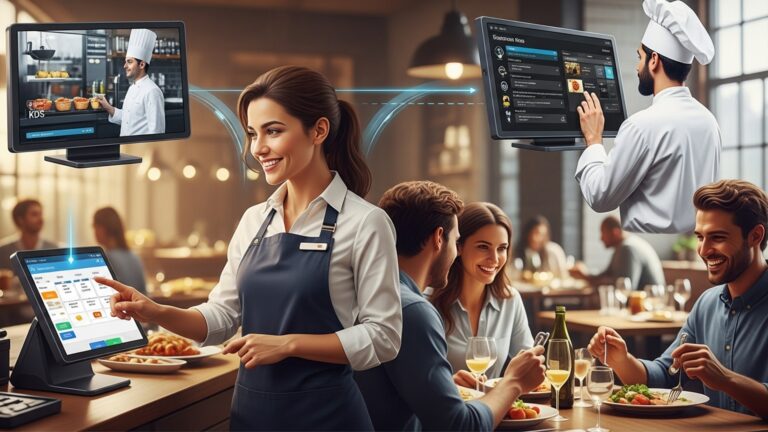
Modern diners expect flexibility. They might order for dine-in, takeout, delivery, or even through third-party apps. Your POS system must seamlessly integrate all these channels. Consider a cloud-based POS system that updates orders in real-time across all terminals, kitchen display systems (KDS). even mobile ordering platforms. This prevents miscommunication, reduces errors. significantly speeds up service.
Beyond basic order entry, look for robust customization options. This includes the ability to:
- Add modifiers (e. g. , “extra cheese,” “no onions,” “rare steak”) with ease, often with visual cues.
- Manage split checks by item, seat, or custom amounts without hassle.
- Apply discounts, promotions. loyalty points directly at the point of sale.
- Handle special requests and dietary restrictions with clear notes sent to the kitchen.
For example, imagine a busy Friday night. A customer orders a burger. wants it well-done, with no pickles. an extra side of avocado. A top-tier POS allows the server to tap these options quickly. the kitchen receives a clear, legible ticket on their KDS, eliminating handwritten errors and improving order accuracy. This level of precision is what sets superior restaurant POS software apart.
2. Robust Inventory Management and Reporting for Your Restaurant POS Software
Ask any seasoned restaurateur. they’ll tell you that managing inventory is one of the biggest challenges—and opportunities for profit. A powerful inventory management module within your restaurant POS software is indispensable. It’s not just about counting bottles; it’s about understanding your costs, reducing waste. optimizing your purchasing.
Effective inventory features should include:
- Real-time Tracking: Automatically deduct ingredients from stock as dishes are sold. This gives you an immediate overview of what’s available and what needs reordering.
- Recipe Management: Link menu items to their precise ingredient lists and quantities. This is crucial for calculating actual food costs per dish and understanding profitability.
- Vendor Management: Track supplier data, order history. pricing to streamline procurement.
- Waste Tracking: Log spoilage, breakage, or expired items to identify areas of loss and improve operational efficiency.
Coupled with inventory, comprehensive reporting and analytics are vital. This feature transforms raw data into actionable insights. Your POS should offer reports on:
- Sales Performance: Identify top-selling items, peak hours. server performance.
- Cost of Goods Sold (COGS): interpret your true expenses and gross profit margins.
- Labor Costs: Track staff hours, tips. payroll to manage staffing efficiently.
- Customer Data: review purchasing habits, loyalty program engagement. preferences to tailor marketing efforts.
Consider the case of “The Daily Grind,” a local cafe. Before implementing a POS with robust inventory and reporting, they struggled with inconsistent coffee bean orders and high pastry waste. Their new system allowed them to track bean consumption by the cup, predict demand for specific pastries based on daily sales trends. even identify which shifts had the highest waste. This data-driven approach led to a 15% reduction in food costs and a significant increase in profitability within six months.
3. Employee Management and Time Tracking
Your staff is the backbone of your restaurant. managing them effectively is paramount to success. A robust restaurant POS software should extend its capabilities beyond transactions to include powerful employee management and time tracking features. This not only streamlines administrative tasks but also helps foster a more productive and accountable team.
Key features to look for include:
- Time Clock Integration: Allow staff to clock in and out directly from the POS terminal. This ensures accurate timekeeping, reduces “buddy punching,” and simplifies payroll processing.
- Permissions and Roles: Assign specific access levels based on job roles. For instance, a server might only access order entry, while a manager can perform voids, issue refunds, or access sales reports. This enhances security and accountability.
- Performance Tracking: Monitor individual server sales, average check size. tip declarations. This data can be invaluable for training, performance reviews. identifying top performers.
- Scheduling Tools: Some advanced POS systems offer integrated scheduling, allowing managers to create and distribute schedules, manage shift swaps. track availability, all within the same platform.
Imagine a scenario where a new server needs training. With role-based permissions, you can give them limited access to practice order entry without affecting live sales. Later, you can track their sales performance over time, offering targeted coaching to help them improve. According to a survey by Toast, a leading POS provider, restaurants using integrated labor management tools can reduce labor costs by up to 5% due to improved accuracy and efficiency. This demonstrates the tangible impact that smart employee management features within your POS can have on your bottom line.
4. Integrated Payment Processing and Security
The ability to securely and efficiently process payments is the fundamental function of any POS system. But, modern restaurant POS software goes far beyond simply swiping a card. It must integrate seamlessly with various payment methods and adhere to the highest security standards to protect both your business and your customers.
When evaluating this feature, consider:
- Payment Versatility: Support for all major credit and debit cards, mobile payments (e. g. , Apple Pay, Google Pay), contactless payments (NFC). EMV chip cards. The more options you offer, the better the customer experience.
- Integrated vs. Standalone Processors: An integrated payment processor means your POS and payment terminal communicate directly, reducing errors and speeding up transactions. Standalone terminals require manual entry, increasing the risk of mistakes.
- PCI Compliance: Ensure the POS system and its payment processor are fully PCI Data Security Standard (PCI DSS) compliant. This is a set of security standards designed to ensure that all companies that accept, process, store, or transmit credit card insights maintain a secure environment.
- End-to-End Encryption and Tokenization: These technologies protect sensitive cardholder data by encrypting it from the moment it’s captured and replacing it with a unique, non-sensitive token. This minimizes the risk of data breaches.
| Feature | Basic Payment Processing | Advanced Integrated Payment Processing |
|---|---|---|
| Payment Types | Credit/Debit Card (Swipe) | Credit/Debit (EMV, Swipe), Contactless, Mobile Pay, Online Payments |
| Data Entry | Manual transfer to terminal | Automatic transfer from POS to terminal |
| Security | Basic compliance (merchant’s responsibility) | PCI DSS certified, End-to-End Encryption, Tokenization |
| Error Reduction | Higher risk of manual entry errors | Minimal errors, faster transactions |
| Customer Experience | Slower, less convenient | Fast, secure, convenient |
Understanding terms like EMV (Europay, MasterCard. Visa) is crucial; EMV chip cards offer enhanced security against fraud compared to magnetic stripe cards. Any modern POS solution must be equipped to handle them. “Data breaches can be catastrophic for businesses, especially in the restaurant industry where trust is paramount,” notes John Smith, a cybersecurity expert specializing in retail payment systems. Choosing a POS with robust, integrated security features is not just a best practice; it’s a fundamental requirement for operating responsibly in today’s digital landscape.
5. Scalability and Third-Party Integrations (APIs)
Your restaurant isn’t static. neither should your POS system be. The final critical feature to consider is the software’s scalability and its ability to integrate with other essential business tools through Application Programming Interfaces (APIs). This ensures your POS can grow with your business and become the true hub of your operations.
Scalability refers to the system’s ability to handle an increasing workload or adapt to changes in your business model. Are you planning to open a second location? Add a food truck? Start offering catering? Your POS should be able to expand its functionality and support these new ventures without requiring a complete system overhaul. Cloud-based POS systems often excel here, as they can be accessed from anywhere and easily scale up resources as needed.
Third-Party Integrations are equally vital. No single software can do everything perfectly. a good POS acts as the central data repository that can “talk” to other specialized applications. Look for a POS that offers robust APIs, allowing it to connect with:
- Accounting Software: Sync sales data directly to QuickBooks, Xero, or similar platforms, eliminating manual data entry and ensuring accurate financial records.
- Online Ordering Platforms: Integrate with your website’s ordering system or popular delivery services like DoorDash, Uber Eats. Grubhub to centralize orders and menu management.
- Loyalty Programs: Connect with customer relationship management (CRM) and loyalty platforms to track customer points, rewards. preferences.
- Reservation Systems: Link with platforms like OpenTable or Resy to manage bookings and guest flow efficiently.
- Employee Scheduling Software: Integrate with tools like Homebase or When I Work for advanced labor management.
An API, in simple terms, is a set of rules and protocols that allows different software applications to communicate with each other. For example, when a customer places an order through your website, the website’s API sends that order data to your POS software’s API, which then processes it. This interconnectedness saves time, reduces errors. provides a holistic view of your business.
For a growing restaurant chain, the ability to integrate their POS with a centralized data warehouse and business intelligence tools via APIs allows them to review performance across all locations, identify regional trends. make strategic decisions based on comprehensive data, rather than isolated reports from each individual site. This forward-thinking approach to technology ensures your investment in a restaurant POS system continues to deliver value as your business evolves.
Conclusion
Navigating the landscape of restaurant POS software requires a discerning eye, as we’ve highlighted with these five critical features. It’s not merely about checking boxes; it’s about envisioning your operational future. My advice is to approach this decision as an investment in efficiency and customer satisfaction, actively seeking demonstrations and testimonials that resonate with your unique establishment. From my experience observing countless establishments, the real differentiator often lies in adaptability. Consider how a modern, cloud-based system streamlines inventory across multiple locations or enables seamless mobile ordering – a non-negotiable in today’s fast-paced dining scene. I once witnessed a local bistro transform its entire service model by adopting a POS that truly integrated its kitchen display system with front-of-house operations, drastically cutting order errors during peak hours. This level of foresight in feature selection is key. Your chosen POS isn’t just a tool; it’s the backbone of your business. Embrace this opportunity to select a solution that empowers your team, delights your customers. ultimately, propels your restaurant towards sustained success. The right choice truly sets the stage for remarkable growth.
More Articles
Choosing The Best Restaurant POS System Five Key Factors To Consider
How to Simplify Restaurant Billing and Order Management with a Smart POS System
How Restaurant POS Software Can Boost Profits And Streamline Daily Operations
Discover Seven Essential Features Your Restaurant POS Software Must Offer Today

FAQs
Why is efficient order and table management so crucial for a restaurant POS?
It’s the heart of your service! A good POS lets staff take orders quickly, easily split checks, manage table statuses. send orders to the kitchen without a hitch. This speeds up service, reduces errors. keeps your customers happy, leading to better table turnover and more tips for your team.
Do I really need inventory tracking built into my POS system?
Absolutely! Integrated inventory management helps you keep tabs on every ingredient, from your top-selling steak to that specific craft beer. It helps reduce food waste, prevents theft. ensures you never run out of popular items, directly impacting your bottom line and customer satisfaction.
What kind of valuable insights can I expect from a strong POS reporting feature?
Beyond just daily sales, a robust reporting system can show you your busiest hours, best-selling dishes, staff performance metrics. even food cost percentages. This data is golden for making informed decisions about staffing, menu adjustments. marketing strategies to boost your profitability.
How crucial is secure and flexible payment processing for my restaurant?
Extremely essential! Customers expect to pay how they want – credit card, mobile pay, split checks, you name it. Your POS needs to handle all these securely (PCI compliance is a must) to protect your business and your customers’ sensitive data, building trust and convenience.
My staff aren’t all tech wizards. How easy should a new POS be to learn?
It should be super easy! An intuitive and user-friendly interface means less time spent on training new hires and fewer mistakes during peak hours. Look for a system that feels natural and requires minimal effort to master, letting your team focus on serving customers, not fumbling with software.
Should my restaurant’s POS integrate with online ordering and delivery platforms?
Definitely, especially in today’s market! Seamless integration means online orders flow directly into your kitchen display system, eliminating manual entry errors and streamlining your takeout and delivery operations. It’s a huge time-saver and a great way to expand your reach and revenue.
What about customer relationship management (CRM) features in a POS?
They’re a big plus! CRM capabilities in your POS can help you collect customer data, manage loyalty programs, offer personalized discounts. even track dietary preferences. This helps you build stronger relationships with your regulars, encourage repeat business. create a more personalized dining experience.