How to Use Restaurant POS Features to Improve Orders Sales and Staff Efficiency
Rising labor costs and thinner margins push restaurants to extract more value from every transaction. Restaurant POS features now sit at the center of that shift. Modern cloud-based systems go far beyond checkout by using real-time sales data to trigger AI-driven upsell prompts, sync online and in-house orders. route tickets instantly to kitchen display systems. Recent advances in mobile POS, QR ordering. contactless payments reduce table turn times, while integrated inventory tracking prevents stockouts that quietly kill sales. At the same time, labor analytics and role-based dashboards help managers schedule smarter and coach staff using performance data instead of guesswork. When used strategically, these tools transform daily operations into a coordinated workflow where orders move faster, teams work with clarity. revenue grows through precision rather than pressure.

Understanding What a Restaurant POS System Is and Why It Matters
A Restaurant POS (Point of Sale) system is a combination of software and hardware that allows restaurants to process orders, accept payments, manage inventory. track performance in real time. Modern Restaurant POS features go far beyond basic billing and have become central to daily operations. According to the National Restaurant Association, technology adoption is one of the top drivers of operational efficiency and customer satisfaction in the foodservice industry. A well-implemented POS system connects front-of-house and back-of-house teams, reducing manual work and minimizing errors. Key components of a restaurant POS system include:
- Order entry and management interface
- Payment processing tools
- Inventory and menu management modules
- Employee scheduling and performance tracking
- Sales and analytics dashboards
Using Order Management Features to Increase Accuracy and Speed
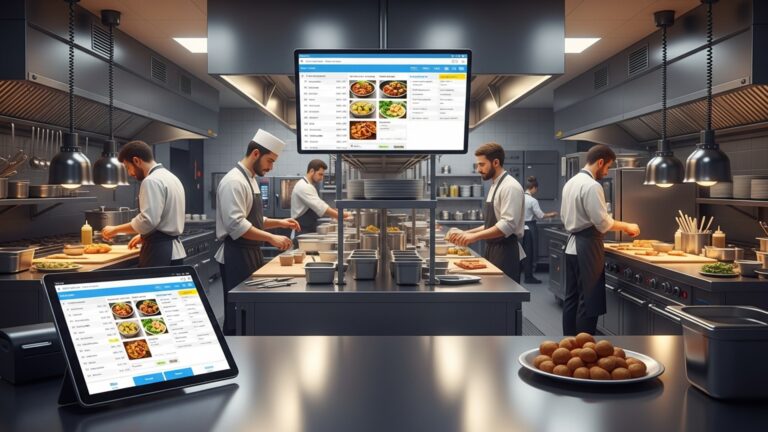
Order management is one of the most impactful Restaurant POS features for improving both sales and staff efficiency. Digital order entry ensures that orders are sent directly to the kitchen display system (KDS), eliminating handwritten tickets and verbal miscommunication. In a fast-casual restaurant I worked with during a system upgrade, order errors dropped by nearly 30% after implementing POS-based order routing. Kitchen staff received clear, time-stamped tickets. servers spent less time clarifying mistakes. Actionable benefits include:
- Faster table turnover due to quicker order processing
- Reduced food waste caused by incorrect orders
- Improved guest satisfaction through consistent accuracy
Leveraging Menu Management to Drive Higher Sales
Menu management tools allow restaurant owners to update items, prices, modifiers. availability instantly. One of the most powerful Restaurant POS features is the ability to examine menu performance using sales data. POS systems often support:
- Menu engineering reports (best-sellers vs. low performers)
- Item-level profitability analysis
- Automatic removal of out-of-stock items
For example, Toast and Square POS systems recommend high-margin items on order screens, subtly encouraging upselling. Harvard Business Review has highlighted menu engineering as a proven strategy to increase average order value (AOV) when data-backed decisions are used.
Improving Upselling and Cross-Selling with Smart POS Prompts
Upselling is easier when staff receive on-screen prompts during order entry. Modern Restaurant POS features include intelligent suggestions such as add-ons, combo deals, or premium upgrades. Common POS-driven upselling techniques:
- Suggesting add-ons like extra toppings or sides
- Prompting drink pairings with meals
- Offering meal upgrades or bundles
In a real-world use case, a casual dining chain reported a 12% increase in average ticket size after enabling automated upsell prompts across all terminals, as shared in a Lightspeed customer case study.
Streamlining Staff Scheduling and Labor Management
Labor costs are one of the highest expenses in the restaurant industry. POS-integrated labor management tools help optimize staffing based on sales forecasts and historical data. Key Restaurant POS features for staff efficiency include:
- Clock-in and clock-out tracking
- Sales-per-labor-hour reporting
- Role-based access controls
By aligning schedules with peak hours, managers can avoid overstaffing or understaffing. According to data from the U. S. Bureau of Labor Statistics, efficient labor allocation can significantly improve profit margins without sacrificing service quality.
Using Inventory Management to Reduce Costs and Prevent Stockouts
Inventory management is a critical yet often overlooked area where Restaurant POS features add measurable value. POS systems automatically deduct ingredients as items are sold, providing real-time stock visibility. Practical advantages include:
- Low-stock alerts for critical ingredients
- Automatic purchase order generation
- Waste tracking and variance reports
For example, a multi-location café used POS inventory reports to identify recurring over-ordering of dairy products, reducing monthly waste costs by 18% within three months.
Enhancing Staff Performance with POS Analytics and Reporting
Advanced reporting tools turn raw data into actionable insights. Restaurant POS features allow managers to track individual employee performance without micromanaging. Common reports include:
- Server sales performance
- Average check size by employee
- Order fulfillment time
These insights help identify training needs and reward high performers. According to Deloitte’s hospitality technology reports, data-driven performance management leads to higher employee retention and productivity.
Integrating Online Ordering and Delivery Channels
Many POS systems integrate seamlessly with online ordering platforms and third-party delivery apps. This ensures all orders flow into a single system, reducing confusion and manual entry. Comparison of order handling methods:
| Method | Error Risk | Staff Effort |
|---|---|---|
| Manual Entry | High | High |
| POS Integration | Low | Low |
Unified ordering is one of the Restaurant POS features that directly improves order accuracy and allows staff to focus more on customer service rather than administrative tasks.
Securing Transactions and Building Customer Trust
Security is a foundational element of any POS system. Modern Restaurant POS features include PCI-DSS compliant payment processing, encrypted transactions. role-based permissions. Security-related benefits:
- Protection against payment fraud
- Controlled access to sensitive data
- Compliance with industry regulations
Institutions like the Payment Card Industry Security Standards Council emphasize that secure POS systems are essential for protecting both businesses and customers.
Training Staff Faster with User-Friendly POS Interfaces
Ease of use directly impacts staff efficiency, especially in high-turnover environments. Intuitive POS interfaces reduce training time and errors. In practice, restaurants using tablet-based POS systems report onboarding new staff in hours instead of days. This is one of the most practical Restaurant POS features for maintaining service quality during busy seasons. Training-friendly features include:
- Visual menus with item images
- Customizable workflows
- Role-specific dashboards
By investing in the right POS features, restaurants empower employees to work confidently, serve customers faster. contribute more effectively to overall business growth.
Conclusion
Using restaurant POS features effectively is no longer about billing faster; it’s about running smarter. When I first saw a small café increase average order value simply by activating smart upsell prompts and kitchen display systems, it became clear how much hidden potential most POS tools hold. Today’s trends like real-time analytics, mobile ordering. AI-driven sales reports make it easier to spot what sells, who sells it best. where teams need support. As orders flow smoothly from screen to kitchen, staff spend less time fixing mistakes and more time serving guests, which naturally lifts morale and sales. My personal tip is to review POS reports weekly, not monthly. coach staff using real data instead of assumptions. Start small, test features during off-peak hours. refine continuously. When your POS becomes a daily decision-making partner, efficiency follows, sales grow. your team gains confidence. Take control of your system today and let your restaurant move faster, smarter. stronger.
More Articles
How to Use Restaurant POS Features to Speed Up Orders and Payments
How Restaurant POS Software Helps Small Restaurants Save Time and Reduce Costs
10 Ways Restaurant POS Software Improves Order Accuracy and Customer Satisfaction
7 Must Have Features to Look for in Restaurant POS Software
How to Choose Restaurant Point of Sale System Features That Boost Daily Operations

FAQs
How can a POS system help increase order value?
A POS can suggest add-ons and modifiers during order entry, making it easier for staff to upsell without sounding pushy. It also highlights popular combos and specials, which often leads to higher average ticket sizes.
What POS features actually save staff time during busy hours?
Quick order entry, customizable menus. table-side ordering reduce back-and-forth trips. Kitchen display systems also cut down on miscommunication, so staff spend less time fixing mistakes.
Can a POS reduce order mistakes?
Yes. Clear modifiers, allergy notes. automated routing to the kitchen help ensure orders are accurate. This lowers remakes and refunds, which improves both efficiency and customer satisfaction.
How does a POS improve communication between front and back of house?
Orders go straight from the server to the kitchen in real time. Updates like out-of-stock items or order status are visible to everyone, reducing verbal checks and confusion.
Is reporting really useful for boosting sales?
Sales reports show top-selling items, slow movers. peak hours. Managers can use this data to adjust menus, pricing. staffing to focus on what brings in the most revenue.
How can a POS help manage staff performance?
Many systems track sales by employee, order speed. voids. This makes it easier to spot training needs, reward strong performers. schedule staff more efficiently.
Does a POS help with faster table turnover?
Yes. Faster ordering, quicker payment processing. split checks all reduce the time guests spend waiting. This allows restaurants to serve more tables without overworking staff.